
How to Take Better Notes at Work in 2026
Table of Contents
Introduction
You walk out of the meeting room clutching three pages of notes. Two hours pass and half of what you wrote makes no sense anymore.
Ever been there?
Bad note-taking habits damage you beyond simple confusion. Action items your boss expects completed slip through the cracks. Critical details vanish from memory, leaving you appearing unprepared. Conversations get rehashed repeatedly because nothing actually stuck in your brain.
Your Note-Taking System Doesn't Work
Most professionals capture notes incorrectly. Frantic writing, desperate hopes that something valuable sticks around. What happens? Disorganized pages full of random thoughts that sit untouched forever.
This goes beyond frustration.
Back in 1895, German psychologist Hermann Ebbinghaus uncovered something vital. His forgetting curve research demonstrated how quickly information disappears without active work to keep it. 70% of what you heard? Gone within 24 hours.
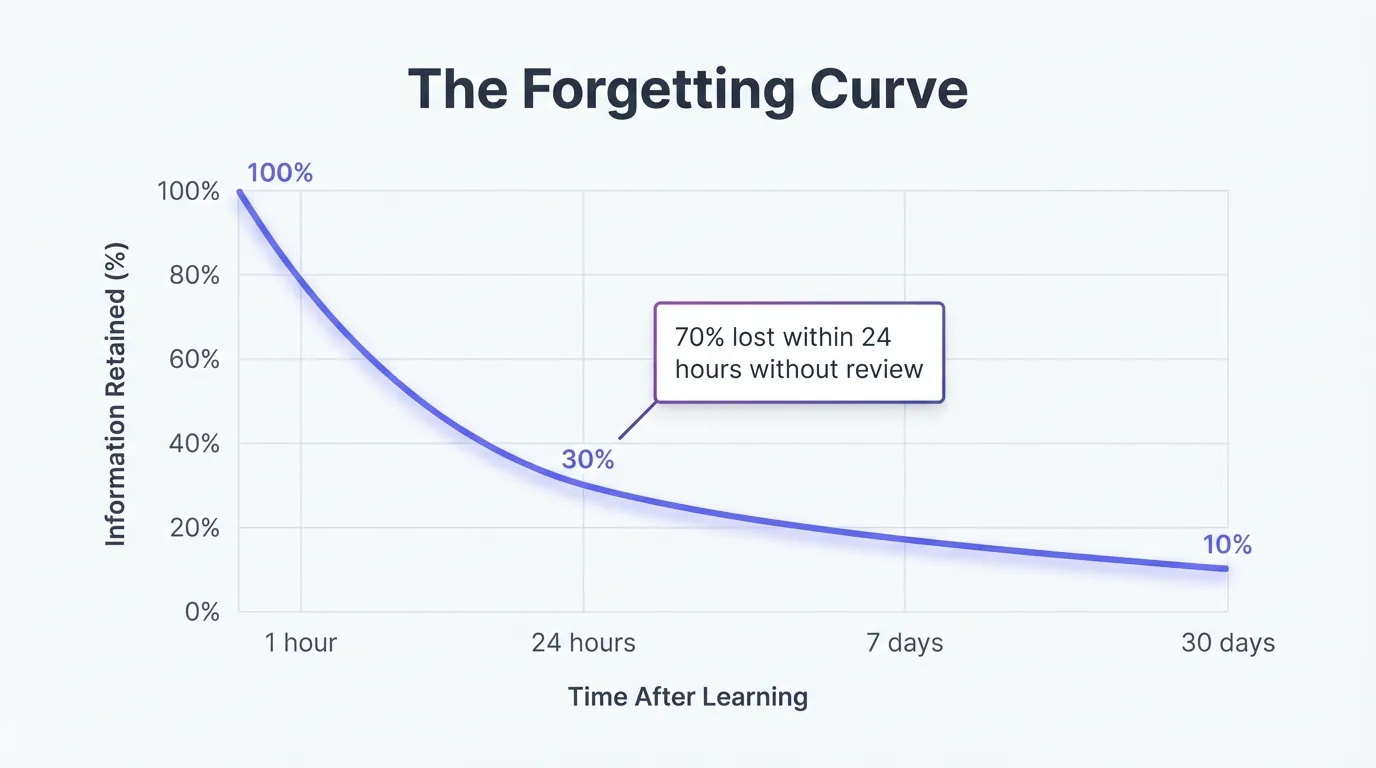
Meeting notes exist to combat this curve. No system means guaranteed failure. The lost art of note-taking damages your career in tangible ways.
The Forgetting Curve Demonstrates 70% Loss Within 24 Hours
Hermann Ebbinghaus conducted memory experiments more than a century ago. His discoveries remain accurate now. When you don't actively work to retain information, your brain dumps most of it quickly.
Think about your actual work environment. Monday morning's meeting? Most details disappear by Tuesday morning. Those action items your manager brought up? Vanished unless you recorded them correctly.
This isn't about your personal shortcomings. Human memory operates this way. The fix isn't forcing yourself to remember better. You need note-taking systems that align with how your brain actually functions.
Three Mistakes That Destroy Your Meeting Notes
First mistake: capturing everything word-for-word. You transform into a transcription machine while active listening stops. Your hand races but your brain processes nothing.
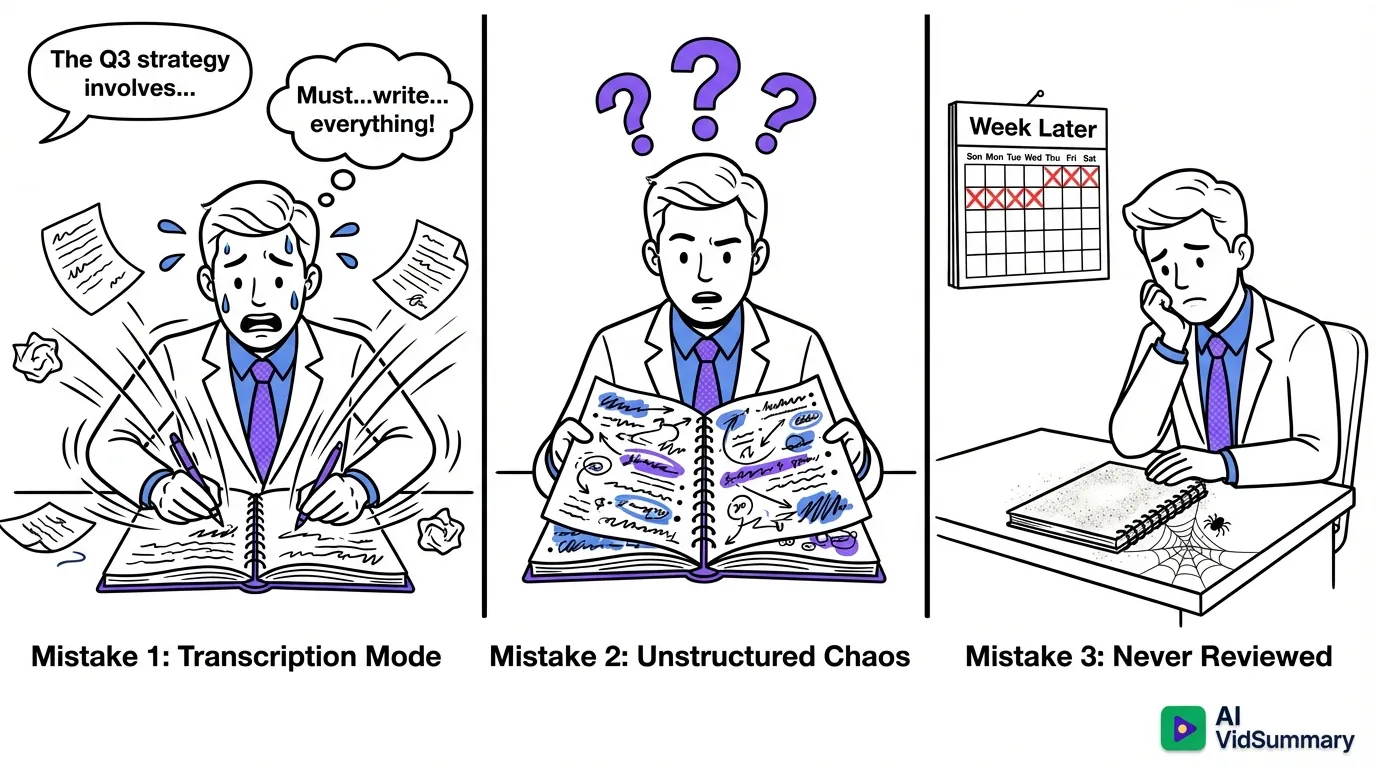
Second mistake: unstructured bullet points scattered randomly. You generate paper chaos that reflects mental chaos. Finding that critical detail later becomes impossible.
Third mistake: writing notes that never get opened again. Yes, the writing process aids retention. But skip the review step and you're still abandoning most of the value.
The Cornell Method Makes Every Meeting Instantly More Productive
Walter Pauk created the Cornell Method at Cornell University's Learning Strategies Center. Built for effective studying and workplace use. This comes from real results, not abstract theory - top performers rely on this system.
The method splits your page into three sections. A narrow cue column runs along the left edge. The main notes section occupies the right side. A summary section appears at the bottom.
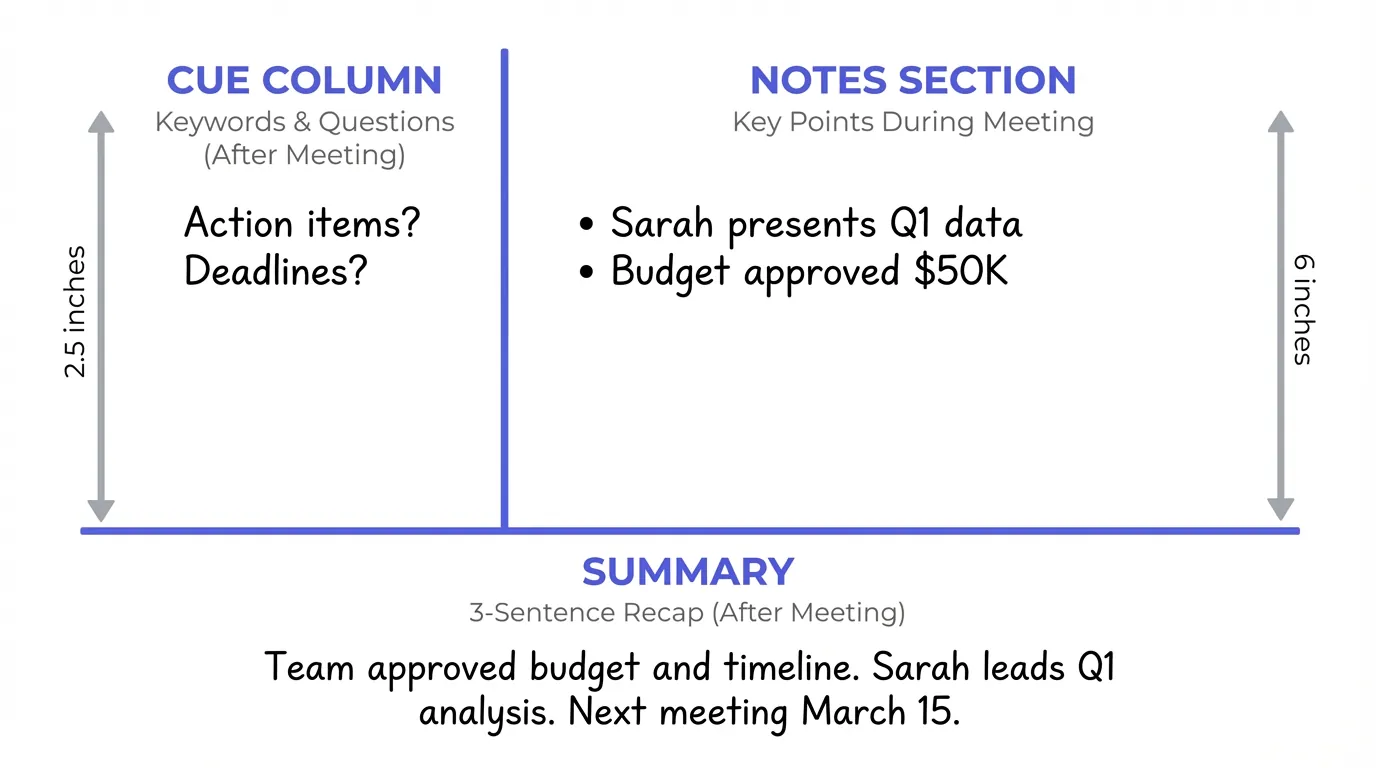
This layout changes how you absorb information.
You write in the main section while the meeting happens. Once it wraps, you fill the cue column with key points. The summary section pushes you to distill everything into a few sentences.
Straightforward. Powerful. Delivers results.
How the Cornell System Works in Real Meetings
Draw a vertical line one-third from the left margin. That creates your cue column. The right portion holds notes captured during the meeting.
While your manager speaks, record key points on the right. Skip transcribing word-for-word. Zero in on decisions, action items, and insights that actually matter.
Once the meeting ends, review your notes right away. Fill the left cue column with keywords and questions. You've just built an instant table of contents.
At the bottom, compose a three-sentence summary. What got decided? What requires action? What's the central point?
Why This Method Beats Random Bullet Points
The cue column generates searchable reference points. You scan the left side and locate exactly what you need. No more rereading full pages hunting for one detail.
The summary section demands active processing. You can't produce a solid summary without grasping what occurred. This mental effort strengthens retention dramatically.
Review becomes part of the system. Research on note-taking systems confirms structured review outperforms passive rereading consistently. Cornell Method builds review into the process automatically, never as an afterthought.
Handwriting Beats Typing for Memory Retention
Norwegian University of Science and Technology studied this extensively. Their research compared handwriting with digital pens versus laptop typing. Handwriting won decisively for memory retention.
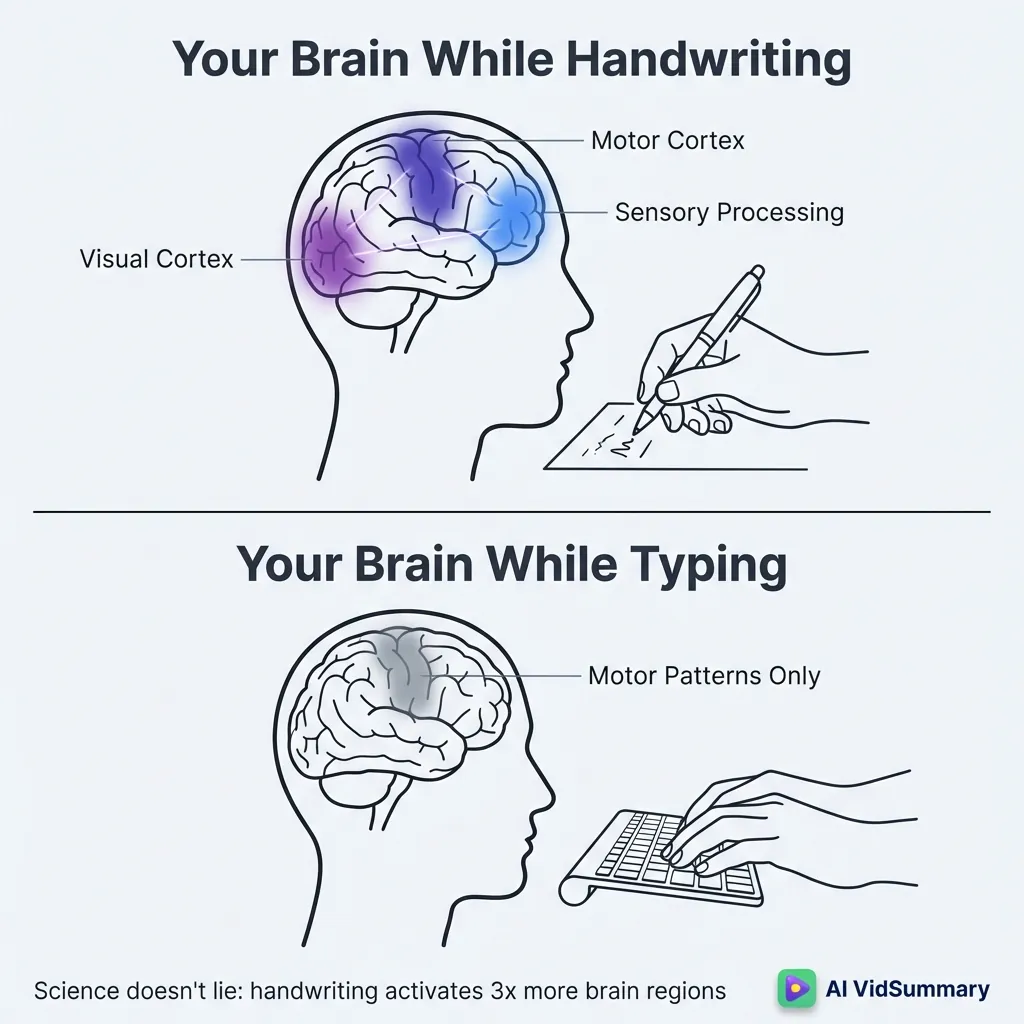
What makes the difference? Writing activates multiple brain regions at once. Your visual cortex processes the letters. Your motor cortex controls the pen. Your sensory-processing regions feel the paper and movement.
This multi-region activation creates stronger memory pathways than typing, which uses mostly motor patterns.
The science is clear: handwriting engages your brain more fully.
The Science Behind Why Handwriting Works Better
Handwriting reaches across visual and motor cortexes. It activates sensory-processing regions that typing ignores. This cross-region activation reinforces retention and strengthens learning pathways.
When you type, your fingers follow practiced patterns. The cognitive load is minimal. When you write by hand, your brain works harder to form each letter. That extra work pays dividends in memory.
Norwegian researchers found handwriting with digital pens more effective than typewriting. The physical act of forming letters matters more than the tool. Digital or analog, handwriting wins.
When Digital Note-Taking Makes More Sense
Digital tools excel at searchability and team collaboration. You can find any note instantly with search. You can share notes with colleagues in seconds.
Typing works well for fast-paced meetings where speed matters most. Some discussions move too quickly for handwriting. Digital captures more volume when necessary.
AI-powered video meeting summaries can complement manual note-taking for webinars and recorded sessions. Let AI handle transcription while you focus on key insights. Best of both worlds.
The Five R's Framework That Top Performers Use
Record, Reduce, Recite, Reflect, Review.
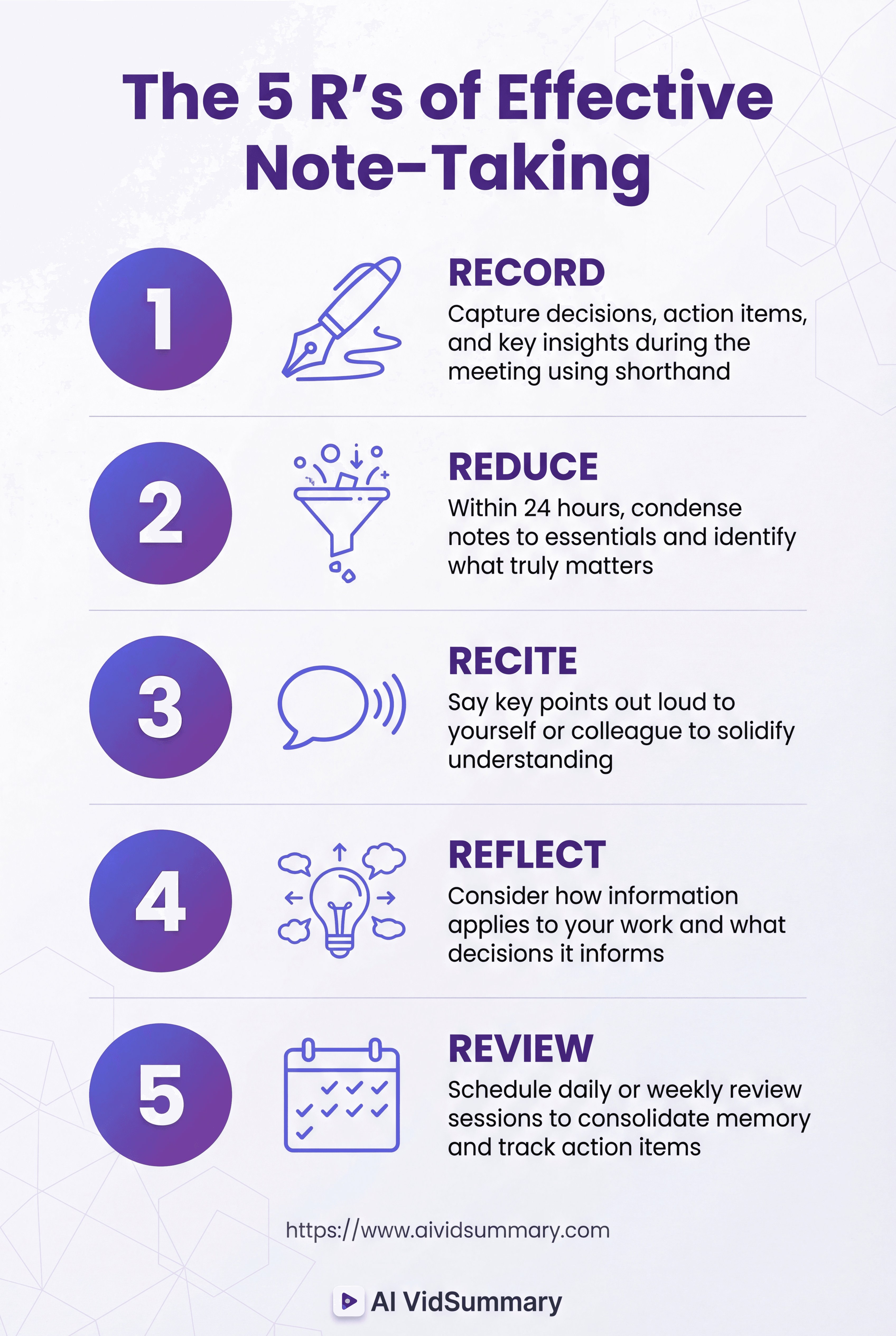
This framework turns note-taking into a complete learning system. Each R builds on the last. Together, they ensure information sticks long-term.
Most people stop at Record. That's why most notes fail.
Top performers use all five R's consistently. They treat note-taking as a process, not a one-time event. The difference shows in their results.
Record and Reduce During the Meeting
Capture key points while the meeting happens. Focus on decisions, action items, and insights that matter. Skip the filler and small talk.
Use shorthand and abbreviations to keep pace. Arrows for action items. Stars for critical information. "w/" for "with" and "b/c" for "because." Speed matters during recording.
Within 24 hours, reduce your notes to essentials. Condense while memory is fresh. This forces you to identify what truly matters versus noise.
Recite, Reflect, and Review After
Recite key points out loud after the meeting. Say them to yourself or a colleague. Hearing yourself explain solidifies understanding.
Reflect on how information applies to your work. What changes based on what you learned? What decisions does this inform? Active reflection beats passive reading.
Schedule daily or weekly review sessions. Look over your notes regularly. This consolidates memory and highlights pending action items. Action item tracking keeps nothing from falling through cracks.
How to Make Action Items Stand Out
Action items disappear in walls of text. You want a visual system that makes them impossible to ignore.
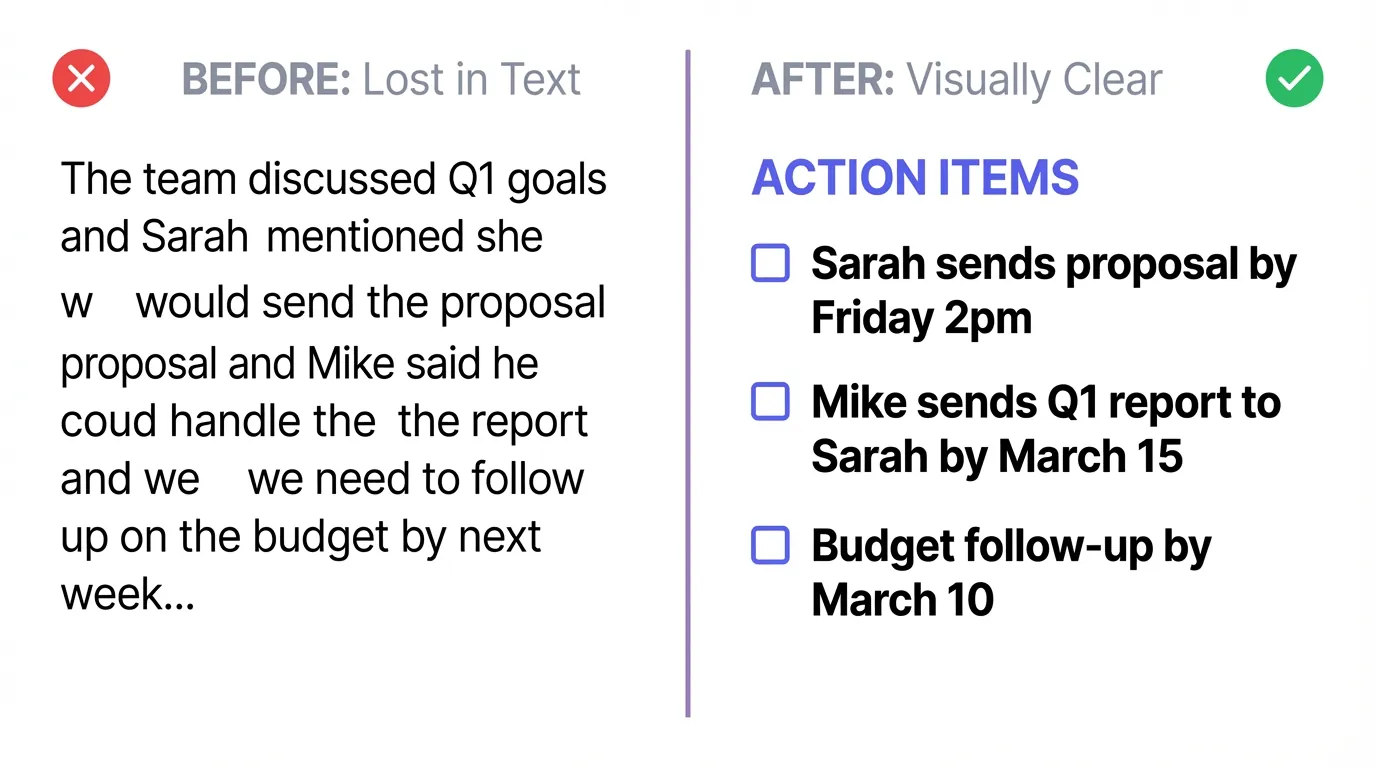
- Bold text works.
- All caps work.
- Highlighting works.
- Checkboxes work best.
Try this.
Build a dedicated action item section at the top or bottom. List every task with who's responsible and the deadline. Use checkboxes so you can mark completion. The visual satisfaction of checking boxes keeps you motivated.
Include specific details: "Sarah sends proposal by Friday 2pm" beats "follow up on proposal." Specificity creates accountability.
Visual Systems That Actually Work
Use bold text or all caps for action items. They jump off the page during review. Color-coding adds another layer if you work with multiple projects.
Add checkboxes next to every task. The act of checking off completed items provides satisfaction. It also shows at a glance what's still pending.
Include who is responsible for each action item. Include the deadline. "Send report" is vague. "Mike sends Q1 report to Sarah by March 15" is actionable.
Build a dedicated action item section at the top or bottom. Don't bury tasks in paragraphs. Make them visible and trackable.
Why Leaders Take Better Notes
Michael Hyatt observed something crucial about leadership and note-taking. When the boss writes something down, people notice. They assume it matters and they'll be held accountable.
Note-taking demonstrates professionalism. It shows you take the work seriously. It establishes accountability for both you and your team.
When leaders take notes, team members follow suit. The behavior cascades down. Everyone becomes more engaged and accountable.
For webinar summarization, AI tools can handle transcription while you focus on strategic notes. Combine tools with human judgment for best results.
The Before-During-After Meeting Workflow
Good note-taking begins before anyone enters the room. Your prep work determines capture quality. Skip this phase and you'll struggle.
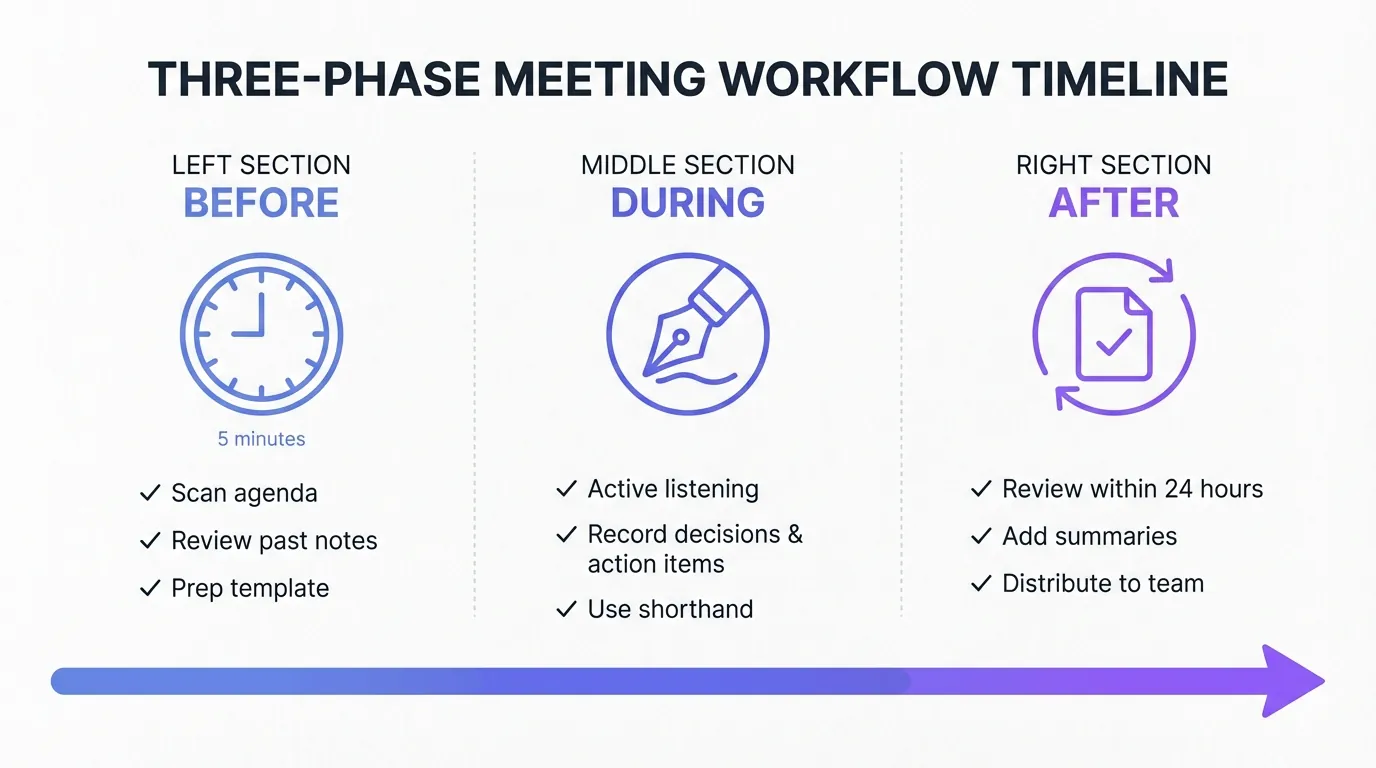
Pull up the agenda early. Scan relevant documents and past notes. Get your template or system ready to go.
Five minutes. That's all.
Five minutes. That's all.
The return on that investment? Massive. Context clicks into place before discussions start. You can zero in on fresh insights rather than scrambling to catch up. Your questions land better because you came ready.
Collaborative note-taking ensures no one misses critical information. Compare notes with colleagues after meetings.
Before the Meeting Starts
Scan the agenda and background materials. Understand which topics are up for discussion. Flag questions that need answers.
Pull up previous meeting notes if this session recurs. Refresh what's already in motion. That context lets you link fresh information to what you already know.
Get your template ready before you join. Cornell Method page open? Action item checkboxes in place? Advance prep means no frantic setup once things begin.
During the Meeting
Keep your attention on speakers. Request clarification when something doesn't track. Active listening guarantees you grasp what you're documenting.
Record decisions, action items, and central insights. Skip verbatim transcription. Filter for impact. You're processing information, not creating a transcript.
Rely on shorthand and abbreviations to maintain pace. Build your own symbol system. Speed in the moment creates space for thorough review later.
After the Meeting Ends
Carve out time within 24 hours for review. Polish your notes while details remain vivid. Restructure if necessary. Cluster related points.
Apply color-coding and summaries. Expand abbreviations that might puzzle future you. This phase converts raw capture into valuable reference material.
Move action items straight to your task list. Distribute notes to relevant team members. Meeting transcription tools can help with record-keeping while you focus on synthesis.
Smart Tools That Actually Save Time
Digital note-taking tools offer real advantages for certain scenarios. Searchability across thousands of notes. Easy editing and reorganization. Seamless sharing with teams.
- Evernote
- OneNote
- Notion
- Google Notes
- Evernote excels at web clipping and cross-platform sync.
- OneNote integrates deeply with Microsoft ecosystem.
- Notion combines notes with project management.
- Google Notes works seamlessly with other Google services.
Pick based on your workflow needs. Centralized storage reduces search time significantly. You'll never lose important notes in random notebooks again.
But.
Digital isn't always superior. Handwriting still wins for comprehension and retention. The optimal approach combines both.
When Digital Tools Make Sense
Digital tools shine for searchability and collaboration. Find any note instantly with keyword search. No more flipping through pages hoping to locate that one detail.
- Evernote has powerful search and web clipping.
- OneNote allows freeform note placement.
- Notion combines databases with notes.
Centralized note systems improve efficiency dramatically. Everything lives in one place. You know exactly where to look. Team members can access shared notes without asking for updates.
Where Human Judgment Still Wins
AI tools can capture dialog and generate summaries. They're excellent for creating reference transcripts. You can search transcripts for specific quotes or details.
But AI transcription doesn't create comprehension. Reading a summary isn't the same as actively processing information during the meeting. Your brain needs that active work.
Optimal approach: combine AI transcription for record-keeping with manual notes for comprehension. AI handles the complete record. You focus on capturing key insights and action items. This division of labor maximizes both accuracy and understanding.
Conclusion
Improved note-taking drives stronger retention, clearer accountability, and enhanced career credibility. Action items stop slipping through the cracks. Professionalism becomes visible. Your reputation for follow-through grows.
Pick one approach this week.
Test the Cornell Method in your next meeting. Sketch that vertical line. Insert cue points afterward. Capture a summary at the bottom. The effort you put into refining your note-taking delivers real returns in productivity and professional standing.
Share this

About AI Vid Summary Team
We're a passionate team dedicated to transforming how people learn from video content. At AI Vid Summary, we combine cutting-edge AI technology with user-friendly design to help students, professionals, and lifelong learners extract maximum value from YouTube videos and online courses.
Try AI Vid Summary

Loading comments...