
This comprehensive comparison with real screenshots will help you choose the right tool for your workflow. Updated December 2025.
Let's start with what you see first. Both tools have clean, modern interfaces, but they focus on different use cases.
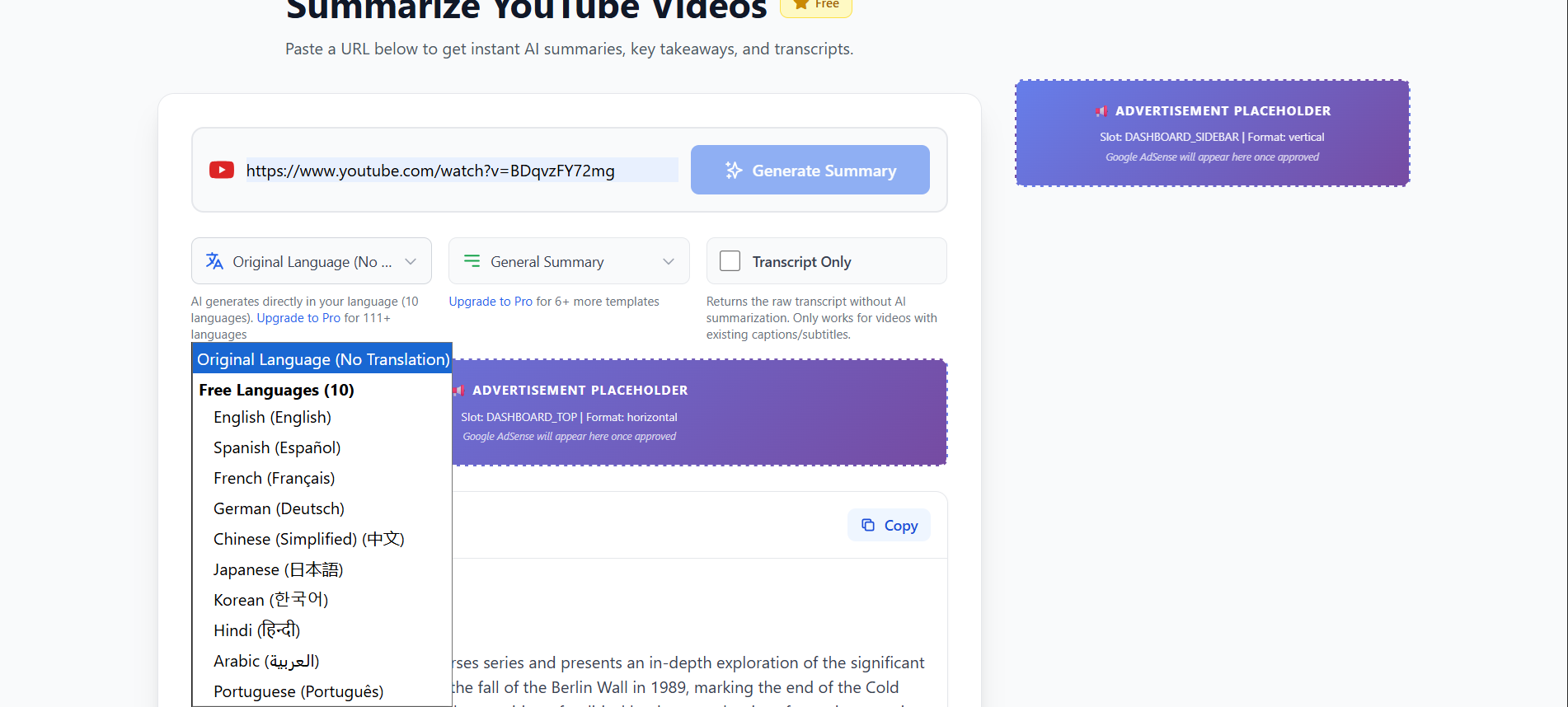
Focus: Clean, YouTube-focused interface. Paste URL → Get summary in 60 seconds.
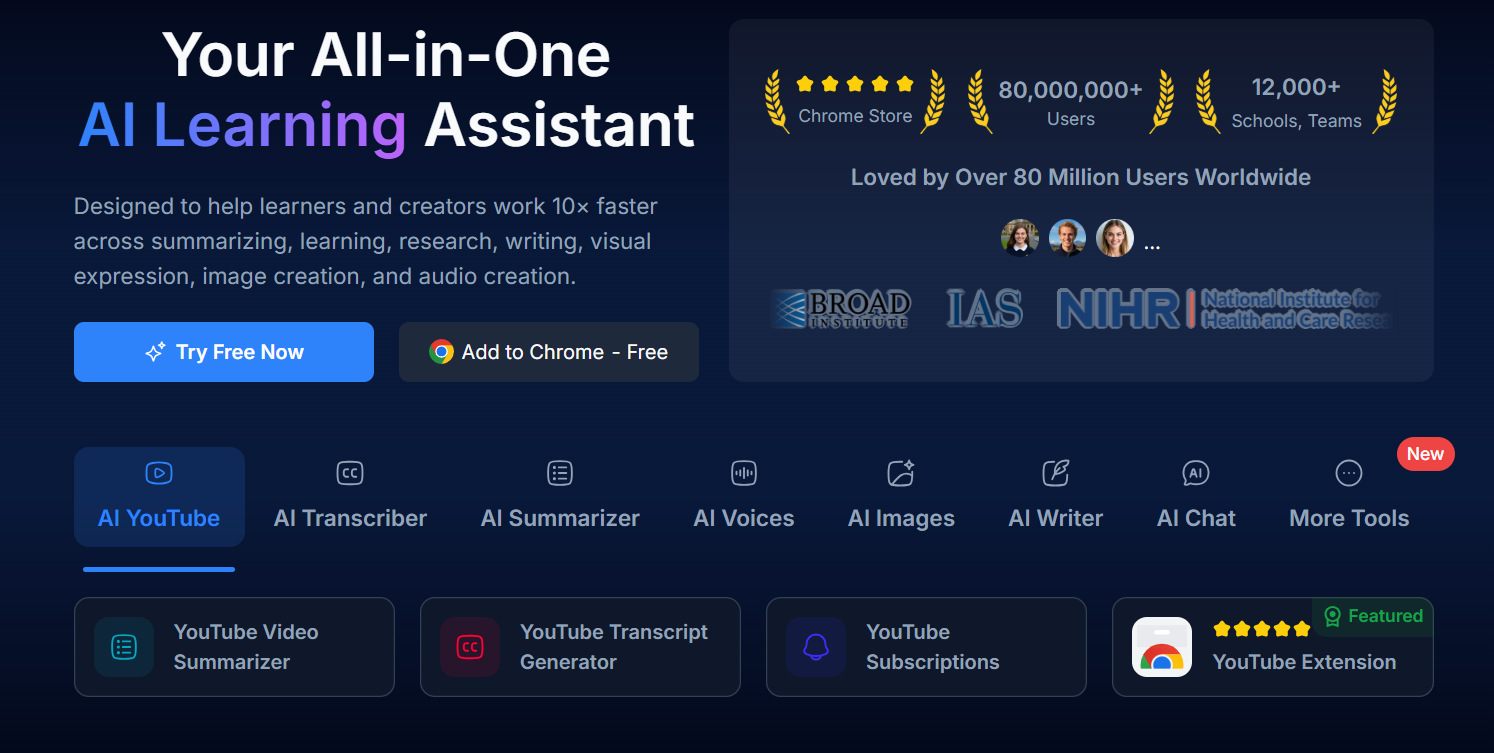
Focus: All-in-one learning assistant. Videos, PDFs, articles, lectures all in one place.
AI Vid Summary has a laser-focused approach: you land on the page, paste a YouTube URL, and get your summary. No distractions, no complex navigation. This minimalist design reflects our philosophy—YouTube summarization done exceptionally well, nothing more.
NoteGPT presents more options upfront: videos, PDFs, articles, web pages. Their homepage communicates "we do it all," which appeals to users who want a single tool for all learning materials. The trade-off is a slightly steeper learning curve.
Verdict: If you primarily consume YouTube content, AI Vid Summary's focused interface gets you to results faster. If you juggle multiple content types, NoteGPT's unified approach may save you from tool-switching.
This is where AI Vid Summary pulls significantly ahead. Let's see why this matters.
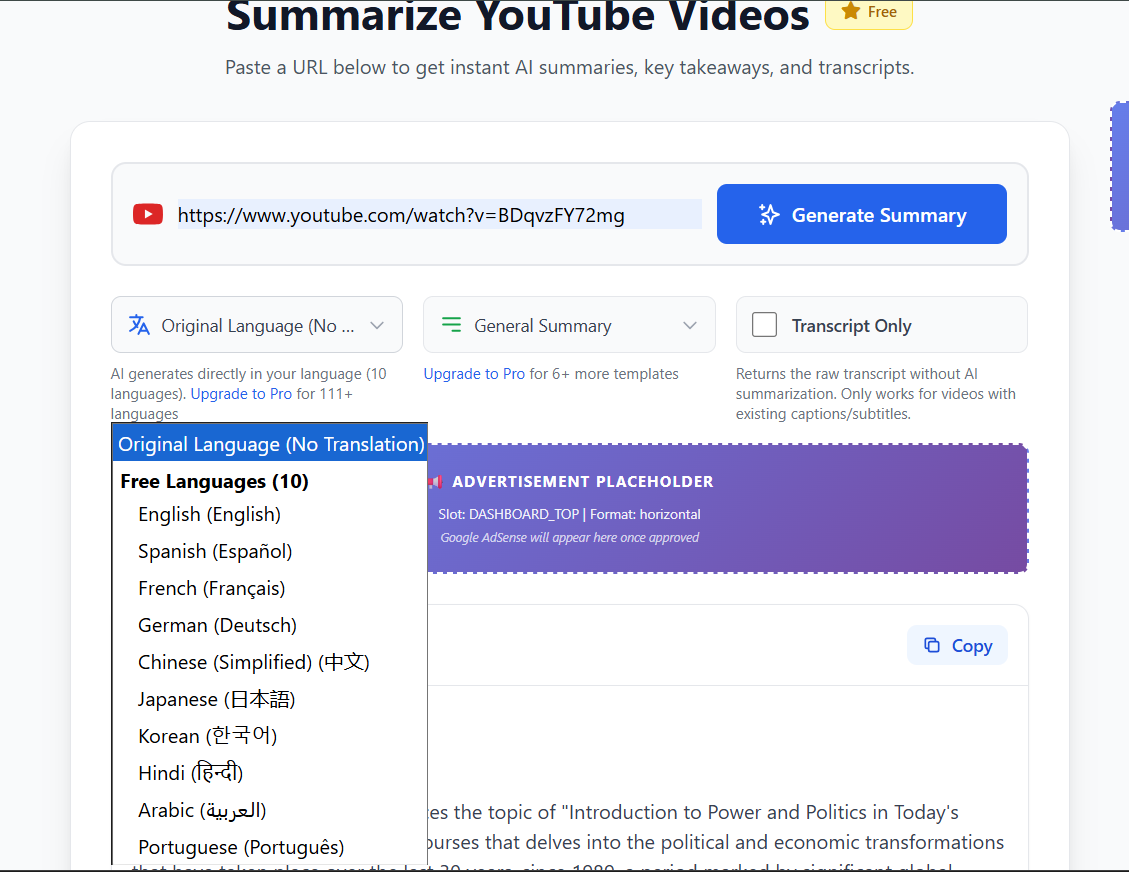
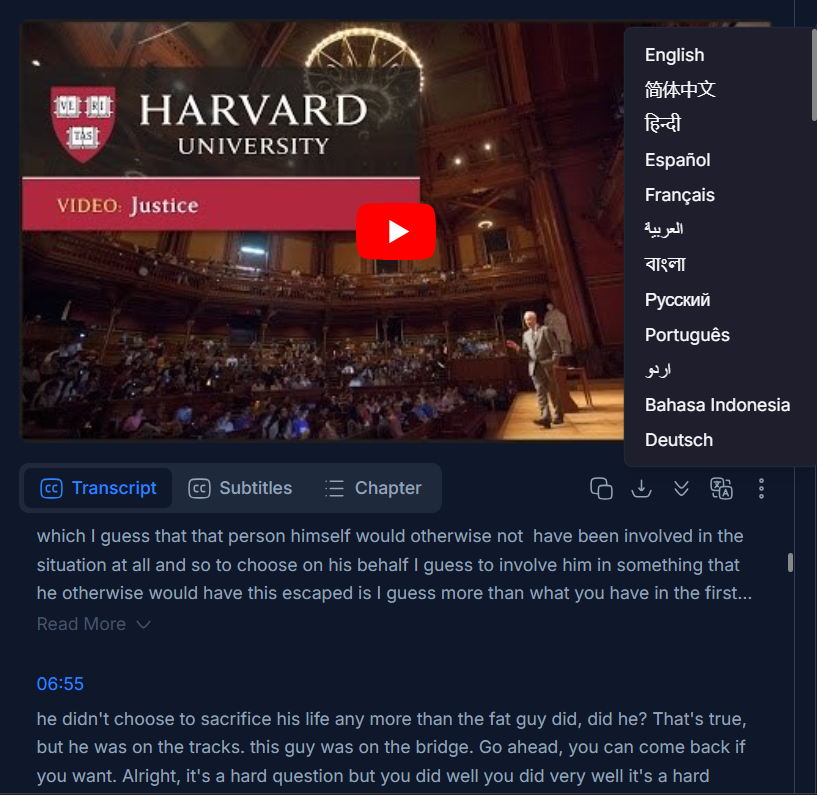
AI Vid Summary supports 111 languages—nearly double NoteGPT's coverage. This isn't just a numbers game. Here's what this means in practice:
NoteGPT's 60+ languages cover the major markets well (Spanish, French, German, Mandarin, etc.). For most users, this is sufficient. But if your work is global, niche, or academic, AI Vid Summary's expanded coverage is game-changing.
Pro Tip:
Use AI Vid Summary for rare languages and global research. Use NoteGPT if you only need major languages AND want PDF/article summarization.
This is a feature NoteGPT doesn't have. Here's why it's a game-changer for power users.
With AI Vid Summary's Ultimate plan ($39/month), you get 5 custom templates that you can design from scratch. Think of them as "summary blueprints" tailored to your exact workflow.
Sales Team Template:
Extract: Pricing mentioned, competitor names, pain points discussed, objections raised, CTA timestamps.
Academic Research Template:
Extract: Methodology, data sources, key findings, limitations, future research directions, citations.
Content Creator Template:
Extract: Viral moments (with timestamps), thumbnail ideas, engagement tactics, editing techniques, monetization mentions.
Market Research Template:
Extract: Market size claims, growth projections, competitor mentions, technology trends, investment signals.
NoteGPT offers 3 basic templates (study notes, detailed summary, brief overview). They're good, but not customizable. You can't tell it "extract only pricing information" or "focus on methodology."
Why This Matters:
If you process 100+ videos per month with specific information needs (researchers, analysts, content teams), custom templates save 5-10 hours per week by extracting only what you need.
Side-by-side breakdown of 15 key features. We tested everything.
| Feature | AI Vid Summary | NoteGPT | Winner |
|---|---|---|---|
| Languages Supported |
111
Industry-leading |
60+
AI translation |
AI Vid Summary |
| Supported Formats |
YouTube videos only
Highly optimized |
YouTube, PDFs, articles, audio, PPT
All-in-one platform |
NoteGPT |
| Free Tier |
Use without signup OR create account
No credit card required |
15 quotas/month
Limited |
AI Vid Summary |
| AI Chat with Content |
With timestamp links |
Standard AI chat |
Tie |
| Mind Map Generation |
Not available |
Visual note-taking |
NoteGPT |
| Notion Export |
One-click export |
Not available |
AI Vid Summary |
| Summary Templates |
12
Study notes, blog posts, etc. |
3
Basic templates |
AI Vid Summary |
| Custom Templates |
5 custom templates (Ultimate) |
Not available |
AI Vid Summary |
| Social Sharing |
Built-in share buttons |
Not available |
AI Vid Summary |
| Public Summary Pages |
Every summary gets URL |
Not available |
AI Vid Summary |
| Summary History |
Unlimited with search
Favorites & organize |
Available
Standard history |
AI Vid Summary |
| Download Formats |
PDF + Markdown
All plans (including free) |
Export available
Standard formats |
Tie |
| Batch Processing |
Queue playlists
Pro feature |
Up to 20 videos
Simultaneously |
NoteGPT |
| Student Discount |
40% off all plans
With .edu email |
20-40% off
Student pricing available |
Tie |
| Entry-Level Pricing |
$0
Free forever Pro: $12/month |
$9.99
Pro plan/month Unlimited: $29/month Max: $99/month |
AI Vid Summary |
Interpretation: AI Vid Summary wins on specialization features (languages, templates, Notion, sharing). NoteGPT wins on versatility (multi-format support, mind maps, batch processing, lower entry price). Choose based on your primary use case.
Let's break down the costs and see what you actually get at each tier.
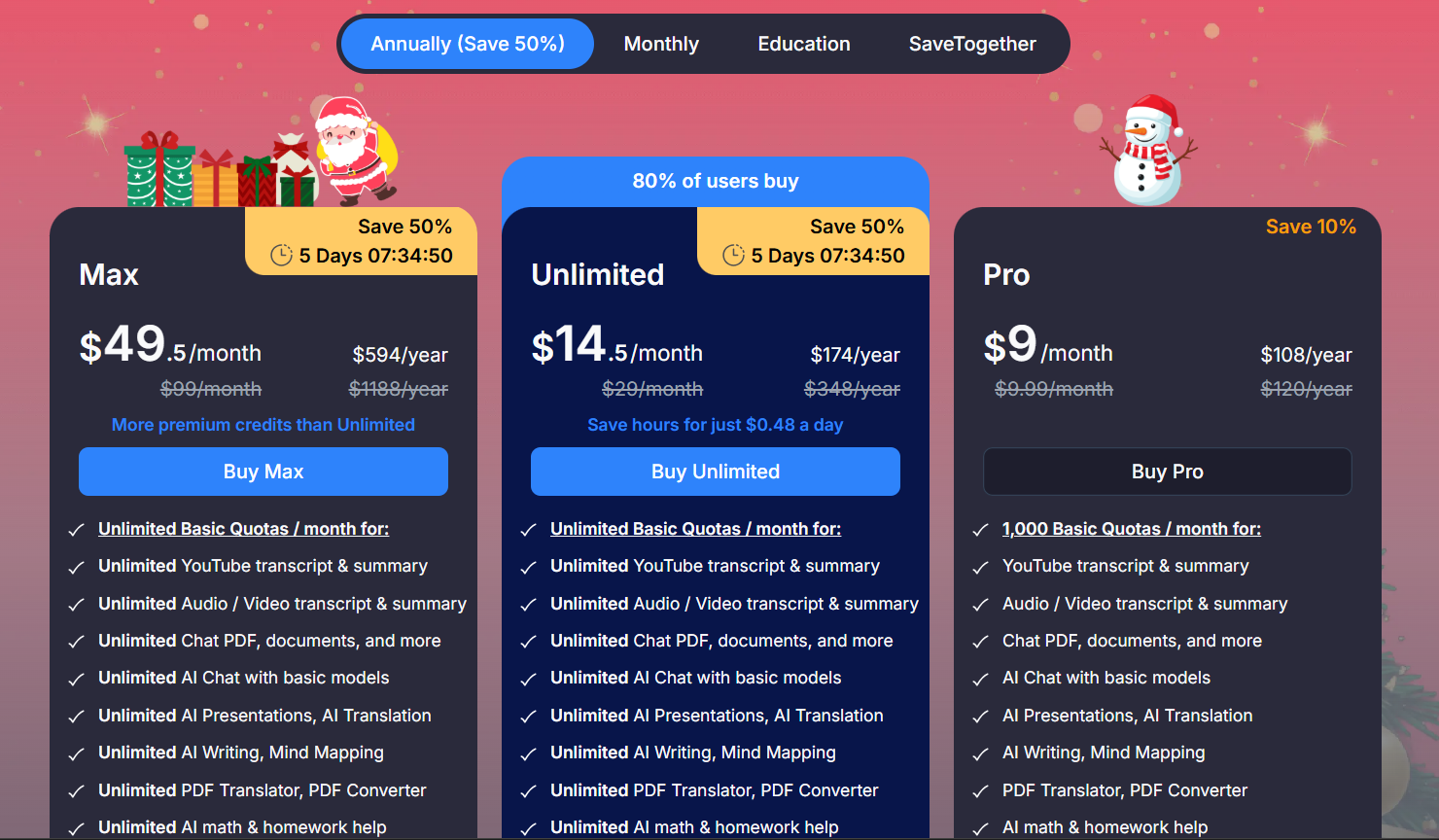
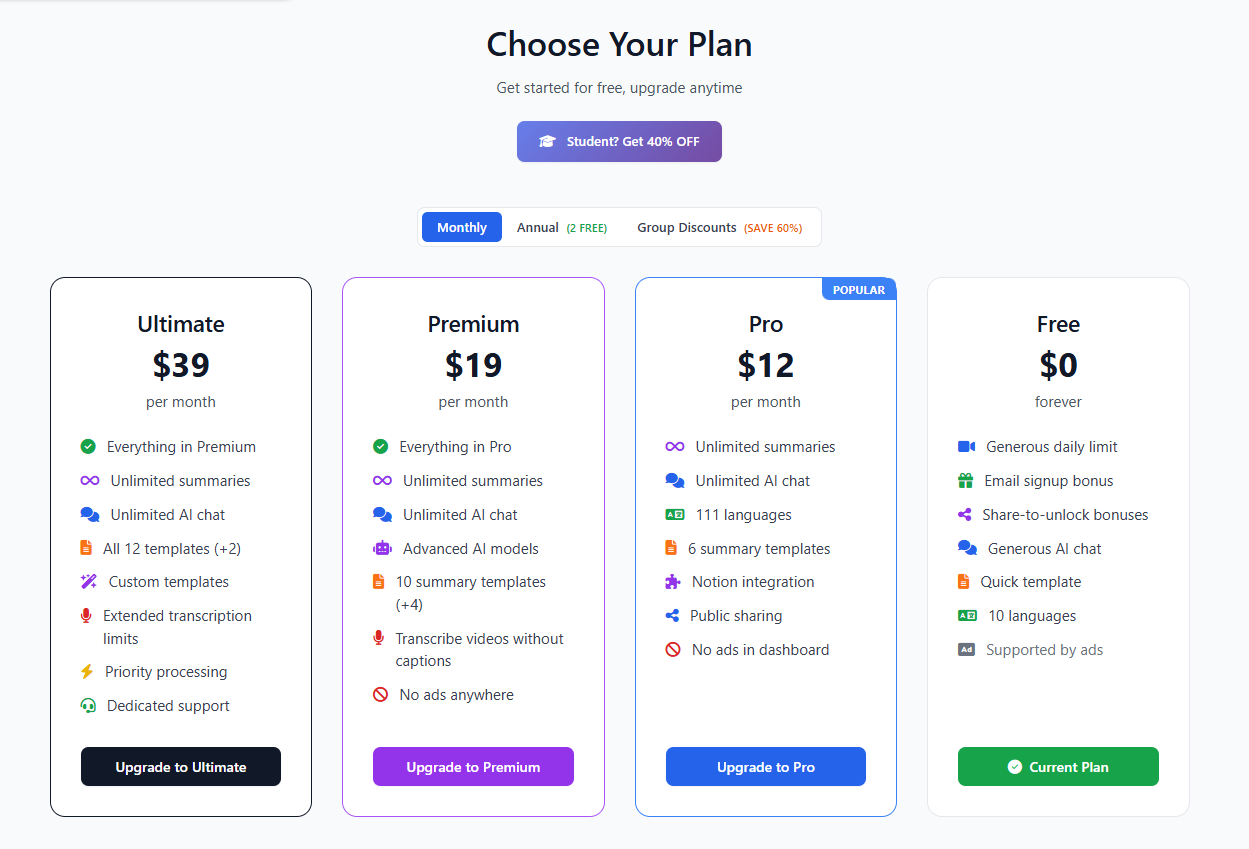
| Plan | AI Vid Summary | NoteGPT |
|---|---|---|
| Free | $0 (use without signup OR create account) | Not available (no free plan) |
| Entry Paid | $12/month (Pro) | $9.99/month (Pro) $9/month annual |
| Mid-Tier | $19/month (Premium) | $29/month (Unlimited) $19.92/month annual |
| Top Tier | $39/month (Ultimate) | $99/month (Max) $69/month annual |
| Student Discount | 40% OFF (Pro = $7.20) | Not available |
AI Vid Summary has a free tier that you can use without even signing up. NoteGPT requires a paid plan starting at $9.99/month. However, NoteGPT offers more comprehensive features for that entry price including PDF summarization, mind maps, and multi-format support.
For YouTube-only users, AI Vid Summary offers better value: Our Pro plan at $12/month includes 111 languages (vs 60), 12 preset templates, custom template creation (Ultimate plan), Notion export, and social sharing—features that NoteGPT doesn't offer even at their $99/month Max tier.
🎓 Students Win Big:
AI Vid Summary offers 40% student discount with a .edu email. Pro plan drops to $7.20/month—cheaper than NoteGPT's Basic plan while offering far more features. NoteGPT has no advertised student discount.
Real questions from users comparing these tools.
It depends on your needs. AI Vid Summary excels at YouTube-specific summarization with 111 languages and workflow integrations like Notion export. NoteGPT is better if you need an all-in-one learning assistant that handles PDFs, articles, and creates mind maps. Both are excellent tools—choose based on your use case.
Yes! Many users strategically use both. For example: Use AI Vid Summary for YouTube videos (111 languages, Notion export, custom templates) and NoteGPT for PDFs and articles. The free tiers of both tools make this approach cost-effective.
AI Vid Summary wins with 111 languages vs NoteGPT's 60+. If you need to translate summaries to less common languages (Swahili, Vietnamese, Tamil, etc.), AI Vid Summary has significantly more coverage. For major languages only, both tools are sufficient.
Both offer student discounts. AI Vid Summary provides 40% off all plans (Pro becomes $7.20/month), while NoteGPT offers 20-40% student pricing. Choose AI Vid Summary if you focus on YouTube lectures and want 111 languages + custom templates. Choose NoteGPT if you need to summarize PDFs and create mind maps for studying.
Yes! You can start using AI Vid Summary immediately with our free tier (no credit card required). Export your summaries from NoteGPT and continue your workflow with Notion export on AI Vid Summary. Many users run both tools in parallel during the transition.
NoteGPT has a lower paid entry point at $9.99/month for the Pro plan (or $9/month annual). However, AI Vid Summary's free tier is more generous (use without signup OR create account) and our Pro plan at $12/month includes more templates (12 vs 3), more languages (111 vs 60), and unique features like custom templates and social sharing that NoteGPT doesn't offer.
Yes! AI Vid Summary offers custom templates on the Ultimate plan (5 custom templates you can create from scratch). This feature is not available on NoteGPT. Custom templates let you design your own summary formats tailored to your specific workflow needs—perfect for researchers, analysts, and content teams.
AI Vid Summary has built-in social sharing with buttons for Twitter, Facebook, LinkedIn, WhatsApp, and Email. Every summary also gets a public shareable URL (like aividsummary.com/s/abc123) that you can share anywhere. NoteGPT does not offer this feature—summaries stay private within your account.
On AI Vid Summary, every summary gets a public URL automatically (similar to YouTube's philosophy of open knowledge sharing). You can share these URLs with anyone or keep them to yourself—it's your choice. NoteGPT summaries are kept private within your account.
Choose AI Vid Summary if you're a YouTube power user who needs maximum language coverage (111), custom summary formats, Notion integration, and social sharing. Best for students (40% discount), researchers, and content creators.
Choose NoteGPT if you need an all-in-one tool for videos, PDFs, and articles with mind map support. Best for learners who work across multiple content types and want visual note-taking.
Both tools are excellent. Your choice depends on your primary content type and workflow.
Both have free tiers • Try both risk-free • Make your own decision