
30 AI Productivity Tools That Actually Save Time in 2026

Table of Contents
Introduction
Imagine this: exam week arrives and you're left with 12 lecture videos to catch up on. Each one lasts 90 minutes. That's 18 hours of viewing time before you can even dive into your actual study sessions. Relatable?
Demir Bentley once clocked 80 hours a week on Wall Street. Stress almost did him in. Today, he puts in just 20 hours a week running a thriving productivity coaching business. His secret weapon? Adopting AI tools strategically, freeing up 20+ hours a week. This change isn't some miracle. It's about selecting the right tools for the right tasks.

Here's a common issue.
Many people have a collection of unused AI tools. They download anything that seems appealing. Yet, most don't get past the initial week. The chaos ends up worse than the original headache.
This guide clears the clutter. I've experimented with over 50 tools to curate 30 that genuinely deliver. They're sorted by category, making it easy to find what you're after quickly.
Time to reclaim your hours.
Why 93% of AI Enthusiasts See Productivity Gains (Yet Many Tools Fall Short)
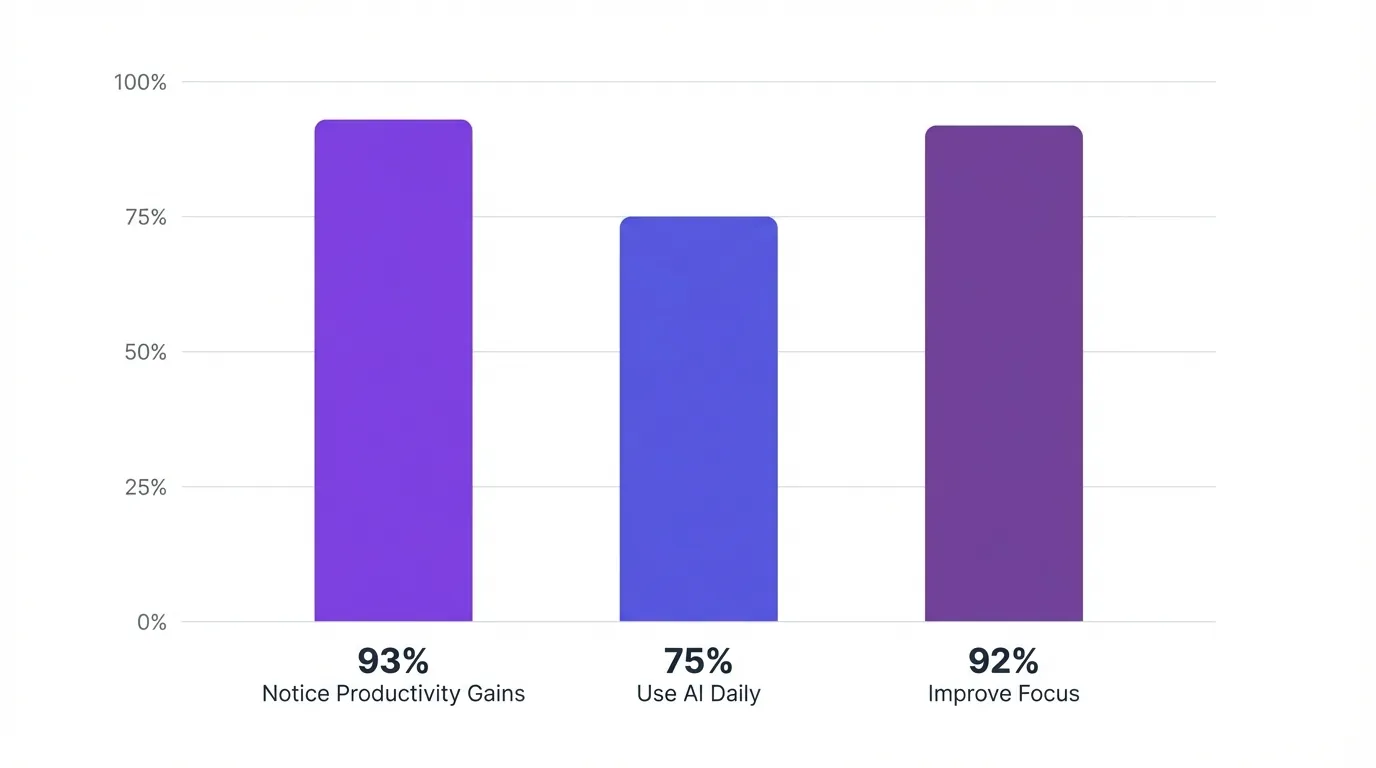
According to research from Microsoft, a whopping 93% of dedicated AI users notice an uptick in productivity. Today, three-quarters of knowledge workers incorporate AI into their daily tasks, and a stunning 92% believe it sharpens their focus on essential duties.
Yet, why do so many tools miss the mark?
The Pitfall of the Tool Graveyard
The issue arises when folks jump to solutions without identifying a problem first. They spot a dazzling new AI app and think, "I need that!" without understanding its purpose. Managing 15 different apps leads to decision fatigue. Each app demands time to master, adding mental strain.
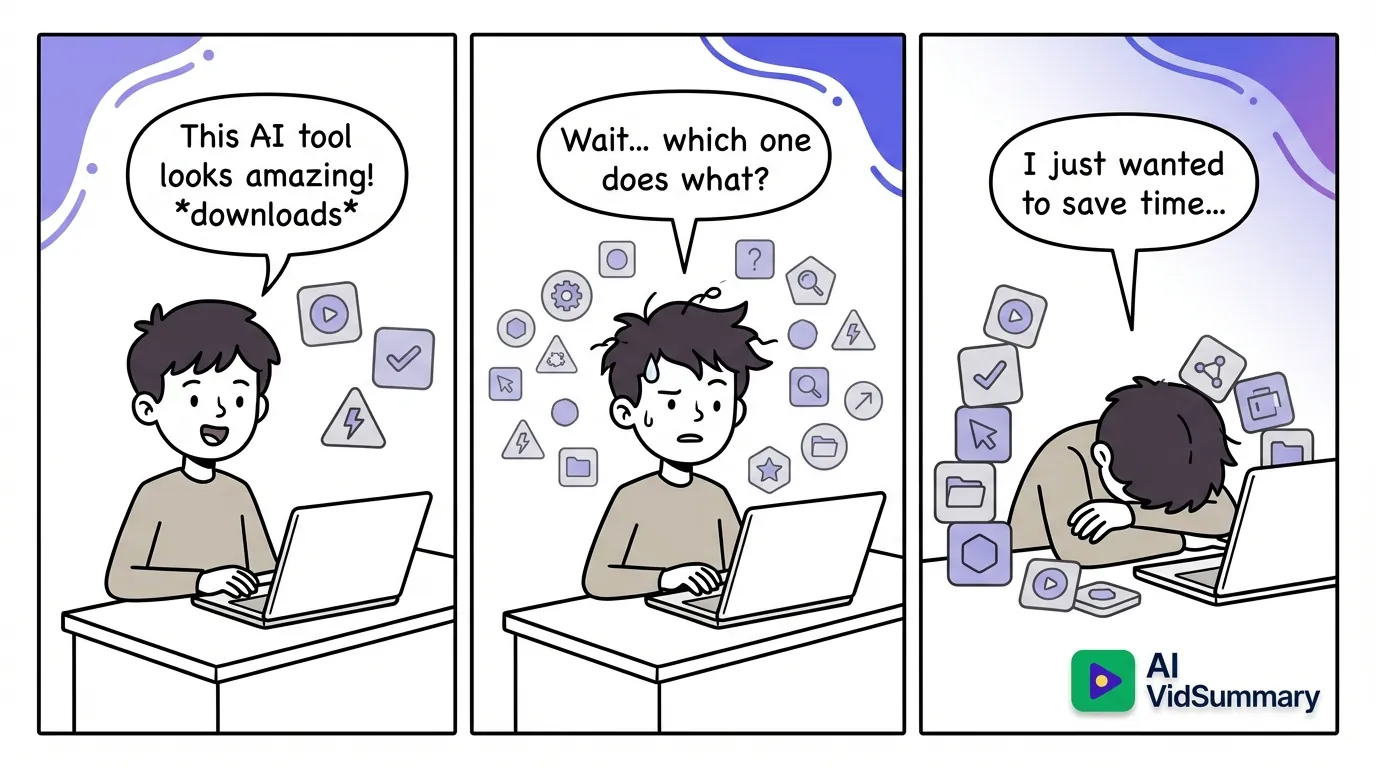
The true expense isn't the subscription itself but the mental burden of constantly flipping between platforms. Our brains aren't wired for nonstop context shifts.
Distinguishing Effective Tools from Mere Hype
Successful tools exhibit distinct features:
- Time savings — They genuinely save time, not just promise efficiency
- Quick learning curve — Learning them takes under 30 minutes
- Focused purpose — They excel in addressing a specific issue
Take Notion, for instance. It tries to do everything - notes, tasks, databases, wikis. Most users only dabble in about 10% of its capabilities. Rewind, on the other hand, masterfully offers a searchable memory of everything on your display. Specialization trumps generalization.
Top tools mesh seamlessly with automated workflows you set up once. They operate on autopilot indefinitely.
Research and Learning Tools That Actually Work (Tools #1-5)
Research can devour your time like no other task. You might start with a single tab to confirm a detail, only to find yourself managing 47 tabs and still no concrete answers.
Tool #1: Perplexity AI
Perplexity AI merges search capabilities with AI, offering cited responses on the spot. Unlike ChatGPT, it scours the internet live. Each response comes with clickable links to sources, allowing you to confirm the information yourself. Demir Bentley reports saving 30 minutes weekly on research thanks to this tool.
The free version is more than enough for most student requirements.
Tool #2: NotebookLM
Google's NotebookLM transforms your uploaded documents into a dynamic knowledge repository. You can upload lecture notes, books, or research materials, ask questions, and get answers right from your content. The AI-driven podcast feature converts complex academic readings into more digestible, conversational audio summaries that you can enjoy while commuting or working out. This process saves approximately 1 hour each week in extracting information.
Tool #3: AI VidSummary
While ChatGPT can summarize pasted text, AI VidSummary is specifically designed for YouTube videos. It supports 111 languages and provides clickable timestamps for verifying claims.
This tool turns hour-long YouTube talks into quick 3-minute summaries. Its unique 4-tier transcript method has a 99.9% success rate, much higher than the 85% industry norm. It works with rare languages and old videos lacking subtitles, ensuring technical terms remain correct. Students claim a 60% reduction in study time while improving retention. One med student, for instance, reduced lecture review time from 4 hours to just 90 minutes.
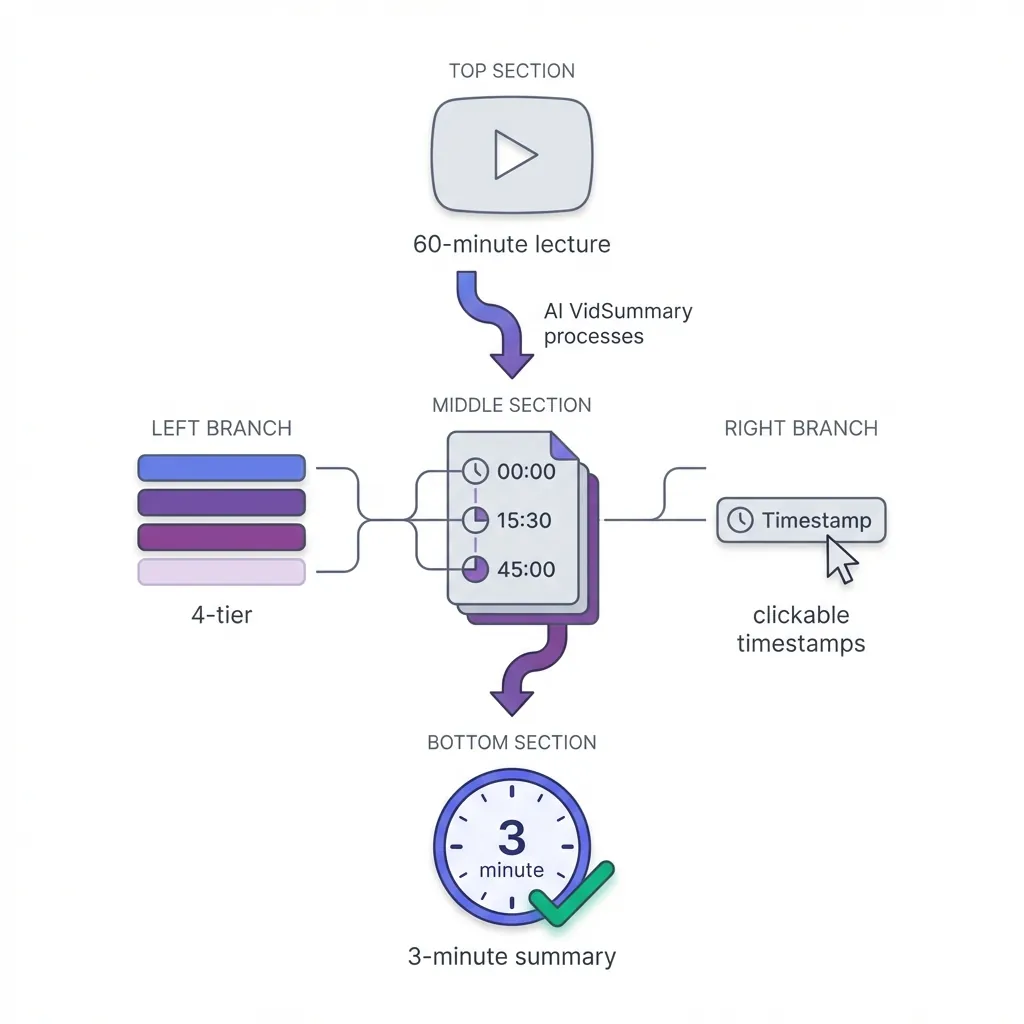
With clickable timestamps, you can jump to specific sections, avoiding intros and filler immediately. It offers 12 customizable templates for extracting quotes, how-to instructions, and code snippets.
The free version allows three summaries each day.
Tool #4: Humata
Humata functions similarly to ChatGPT but focuses on PDFs. Upload research papers and inquire about their content. A Reddit user, ai_tools98, noted, "Unlike ChatGPT, it sticks to information from your uploaded documents without fabricating anything."
However, when dealing with complex documents, some nuances may be lost in the summary. It's ideal for in-depth analysis of single documents rather than cross-referencing multiple sources.
Tool #5: Coral AI
Coral AI has won the Reddit community’s approval for document-based research. It creates outlines, summaries, and citations from your uploaded files. The main perk? It doesn’t invent information.
One student mentioned, "You can upload any document, and it will create outlines, condensed notes, citations, or whatever else you require." For academic tasks, its precision surpasses that of general AI tools.
AI Writing Helpers That Feel Human (Tools #6-9)
Writing software can either be a time-saver or an editing disaster.
Tool #6: Grammarly
Grammarly serves as a real-time grammar monitor wherever you're typing - be it Gmail, Google Docs, social networks, or messaging platforms. Its tone detection allows you to adjust your style to suit formal or informal settings. Clarity tips clear up wordiness and ambiguity.
For most students, the free version covers all bases. It saves roughly an hour each week by ensuring error-free writing. A ProWritingAid comparison reveals each tool's unique strengths.
Tool #7: ProWritingAid
ProWritingAid offers a one-time payment for lifelong access to all its features, bypassing subscription fees. Its in-depth writing insights are perfect for involved academic essays. Style reports pinpoint repetitive words and sentence structure flaws.
Students watching their budget often favor this over Grammarly's recurring charges. However, getting familiar with the interface requires some time.
Tool #8: Claude
Claude shines when it comes to intricate writing and thorough analysis. Claude 3.5 Sonnet delivers results twice as quickly as previous versions, with a knowledge limit extended to April 2024, surpassing many rivals. A Reddit user remarked: "I use chat gpt to turn my bullet pointed notes into lesson reports."
Free users are limited to 12 messages every few hours. Saves approximately an hour each week on detailed assignments. It grasps academic context better than ChatGPT.
Tool #9: Jasper AI
Jasper AI is tailored for marketing content using ready-made templates. It quickly generates blog entries, social media posts, and email campaigns. Some Reddit feedback mentions over-creation issues: "producing so much output that editing becomes a nightmare."
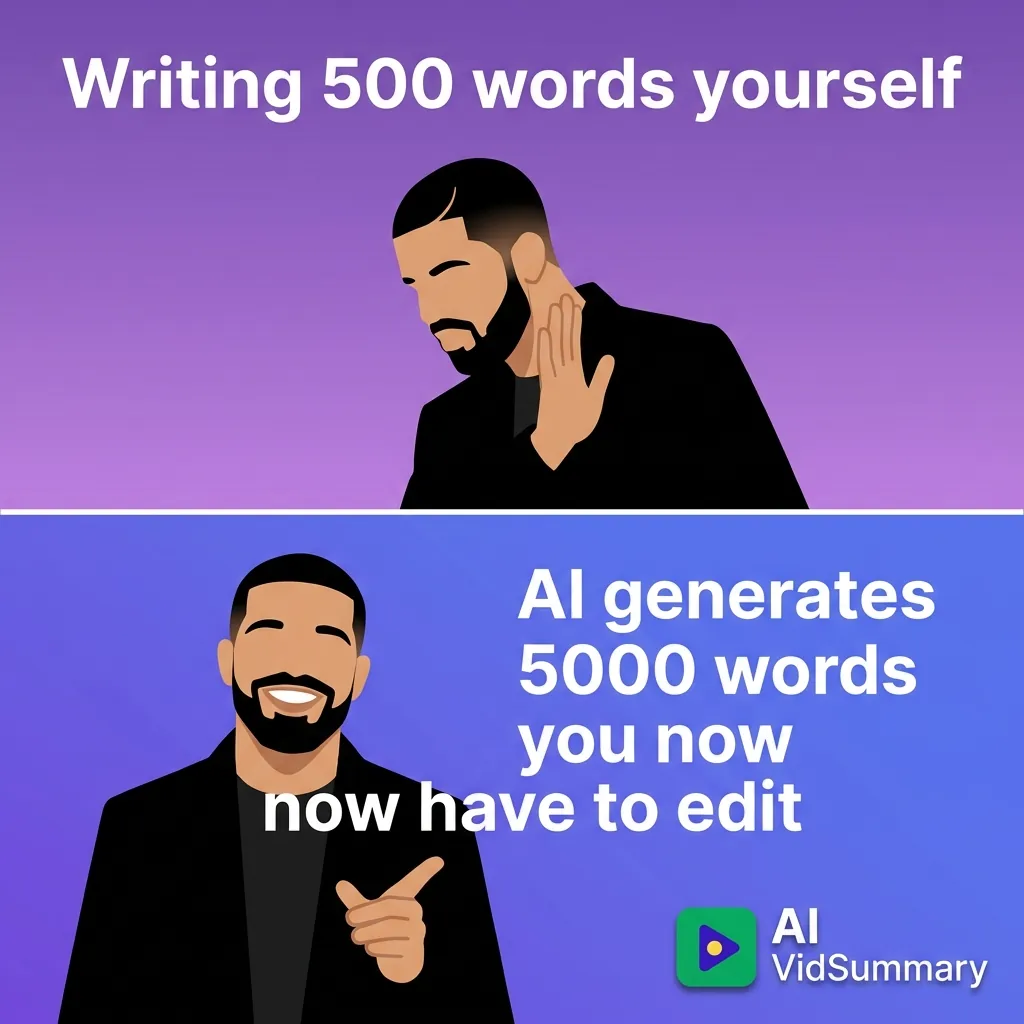
Ideal for jump-starting marketing text. If you're not cautious, editing can take longer than writing from scratch.
Capturing Every Detail: Meeting and Note-Taking Tools (Options #10-13)
Struggling to focus in meetings because you're jotting down notes all the time? Why not remove that distraction?
These tools boast over 90% accuracy, although feedback from Reddit users is mixed.
Tool #10: Fathom
Fathom creates automatic summaries for your meetings, complete with action items, boasting speaker identification accuracy of over 90% in most situations. Demir Bentley finds it indispensable, saving him an hour each week. It transcribes in real-time for Zoom, Teams, and Google Meet.
Instead of frantically note-taking, you get to be truly engaged, enhancing the meeting experience.

Tool #11: Otter.ai
Otter.ai captures lectures and meetings live, allowing students to share notes with timestamps for group study sessions. The free version offers 300 minutes per month, ideal for most classes. Fireflies.ai features similar functionalities with enhanced CRM links.
A Reddit user raised a fair point: "Does it genuinely save you time by transcribing notes automatically, or do you spend more time sorting through them?" The accuracy can fluctuate based on audio quality.
Visit best transcription apps for a thorough comparison. Explore Fathom vs Fireflies to see which fits your needs.
Tool #12: Fireflies.ai
Fireflies.ai automatically records meetings across various platforms. Its conversation intelligence highlights key topics and action items, enhancing team collaboration compared to Otter in professional environments. It also integrates with Zapier to simplify Midjourney automation and Outlook automation processes.
Tool #13: AudioPen
AudioPen turns your spontaneous voice notes into organized text. A Reddit user describes it as "my daily go-to for converting my spoken thoughts into notes." Its mobile-friendly design makes it easy to capture ideas on the fly, transforming chaotic thoughts into well-structured paragraphs.
Ideal for students who articulate their thoughts best through speaking.
Task and Project Management Tools to Ease Overwhelm (Options #14-17)
Tired of wasting hours deciding what to do next? Smart tools take that burden off your shoulders.
Tool #14: Motion
Motion uses AI to automatically slot your tasks into your calendar. Their claim? Users boost work output by 137%. Reddit user itisanotheraccount confirmed, "it blocks timeslots in my calendar for my tasks. Been using it for a couple of weeks now and love it so far."
Syncs both personal and professional calendars for a complete view of your day. You're ready for whatever comes. Say goodbye to indecision.
Meetings pop up? AI reshuffles your schedule to accommodate.
Tool #15: Asana AI
Asana delivers a workflow with no meetings or emails involved. Demir Bentley notes it saves him 5 hours each week. This AI foresees project risks and workflow hiccups before they become big issues. Advanced automation deals with up to 25,000 rule-based tasks each month on paid plans.
The free version caters to 10 users with limitless tasks. Ideal for student project groups. For more choices, see best AI project management software.
Tool #16: Todoist
Todoist lets you input tasks in everyday language. Type "meeting tomorrow 3pm," and it schedules it accurately. Habit tracking reveals productivity patterns over time. Syncs across devices for easy access. Prefer a visual approach? Check out Trello for kanban-style boards.
When it comes to managing daily tasks, keeping it simple often wins.
Tool #17: Goblin Tools
Goblin Tools turns daunting projects into bite-sized parts. Reddit user Miserable_Art_2954 shares it "helps me sort out, prioritize, break down, and estimate tasks SO much faster." Estimating time for small tasks avoids overloading.
Praised for its ADHD-friendly project management, it pairs well with Webex collaboration and Buffer automation. Round out your productivity suite with Gmail automation.
Email and Communication Tools That Save Up to a Month Annually (Tools #18-21)
People spend a staggering one month per year dealing with email. That's 160 hours gone forever.
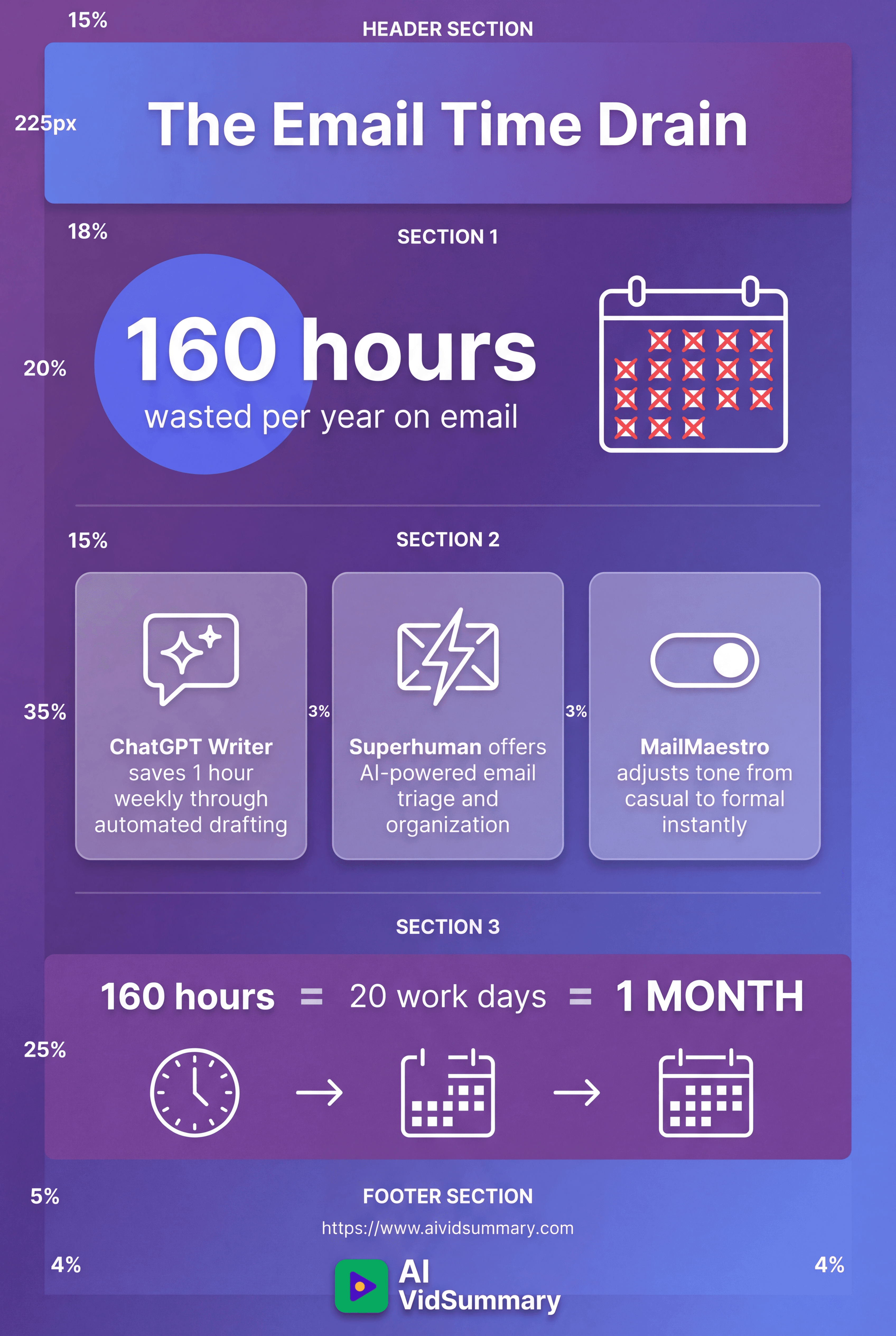
Time to take it back.
Tool #18: ChatGPT Writer
ChatGPT Writer crafts emails from bullet points with ease. This browser extension integrates smoothly with Gmail. It learns your writing style by examining past emails. Demir Bentley claims it shaves off 1 hour each week on email tasks. Eases the mental stress of formulating polished replies.
A Reddit user notes: "I use it to write emails and sometimes longer text and WhatsApp messages, which helps me sound less blunt in a professional sphere."
Tool #19: Superhuman
Superhuman provides AI-driven email organization with a keyboard-centric approach. Its high price is aimed at dedicated professionals. Quick reading abilities and intelligent triage slashes inbox time significantly. Texts.com combines all messaging services into a single platform. Major downside: lacking a mobile app. Exclusively desktop frustrates those who use phones for replies.
Tool #20: MailMaestro
MailMaestro creates emails for Outlook and Gmail with a single click. Adjust the tone from casual to formal instantly with a slider. Control response length to avoid unnecessarily long emails.
A European company committed to data protection. Plus AI manages presentation building from prompts. AI music creators and PowerPoint alternatives widen creative possibilities.
Browser and Search Tools That Truly Transform Your Workflow (Tools #22-24)
Tool #22: Arc Browser
Arc Browser shakes up how you juggle tabs by using vertical sidebars instead of the usual horizontal ones. This visual setup appears more organized and tidy. Power users will appreciate its AI capabilities and ample customization, although it takes a bit to get the hang of it, especially if you're used to horizontal tabs. Some might find the customization options a bit much initially.
One user described the sidebar as "a game-changer" for structuring their browsing experience.
Tool #23: ChatGPT
ChatGPT acts like your round-the-clock mentor and creative collaborator. Demir Bentley manages to save 8 hours each week thanks to this tool. One of his clients used to spend 90 minutes every Sunday planning meals, but with ChatGPT, it's now a quick 3-minute task.
Ask it the right questions, and it'll give you the best answers. Be specific with prompts for better outcomes.
Reddit contributor LT_Rager agrees: "chatGPT has saved me TONS of time on various projects."
The free tier covers most student requirements effectively.
Tool #24: Google Gemini
Google Gemini brings AI into Gmail, Docs, and Sheets, with real-time web searches to ensure info is up-to-date. This setup saves you 30 minutes a week through faster insights and automation. Free access is available with any Google account.
Seamlessly integrates with tools you already rely on daily. Templafy and Mem automation boost document efficiency. AI presentation makers round out the content suite.
Content Creation and Design Tools for Non-Designers (Tools #25-27)
Design expertise shouldn't stop your creativity.
Tool #25: Canva with AI Features
Canva creates visuals from text cues and effortlessly removes backgrounds. Magic Design rapidly produces presentations and social media graphics. The templates have every conceivable need covered for students. Most tasks are manageable on the free plan without any charges.
A Reddit user, Couinty, shares: "I've used midjourney for business and school projects." Visual content creation becomes accessible to everyone.
Tool #26: Descript
Descript transforms video editing by allowing text-based modifications. Initially, it transcribes videos into scripts. Edit the script, and the video automatically gets adjusted. You don't need to mess with timelines. It also automatically eliminates filler words, refining recordings. How to use Descript offers comprehensive guides on the process.
The learning curve is steep but the time savings are substantial.
Tool #27: Gamma
Gamma generates entire presentations from text instructions. Modern templates offer instant professional appeal. Drafts are quicker to create than with PowerPoint.
Slides keep a uniform look effortlessly. Recast AI transforms articles into engaging audio. Notion automation and Canva automation enhance content process efficiency.
Tools for Managing Your Time and Calendar Efficiently (Tools #28-30)
Tool #28: Reclaim.ai
Reclaim.ai is your ally in safeguarding time for routines and key tasks. It protects your weekly workout goals and reading plans. Should any conflicts pop up, it adjusts your schedule automatically, ensuring priorities remain intact. It even claims to save you an hour every week.
Say goodbye to overlooking vital habits.
Tool #29: Clockwise
Clockwise smartly manages team schedules to cut down on disruptions from meetings. It sets up focus blocks for deep work and finds suitable meeting times, eliminating endless email discussions. Ideal for groups aiming for better coordination and teamwork.
Individuals might not get as much out of it compared to teams.
Tool #30: Type.ai
Type.ai efficiently handles meeting arrangements through natural language email prompts. The AI takes care of the scheduling back-and-forth seamlessly. It syncs easily with popular calendar platforms.
Explore best AI scheduling assistants for in-depth comparisons. Missive merges email with team chat. Evernote automation and AI resume builders add to the productivity suite.
The Hidden Gem of Workflow Automation: It Connects Everything
Tool integration is what makes the difference between success and being swamped.
Why 78% of Companies Find AI Integration Challenging
Many tools fail to communicate effectively with one another. Moving data manually from one system to another is a massive time drain. That's where Zapier steps in as your AI productivity command hub, linking over 8,000 apps to automate interactions. Demir Bentley reclaims 2 hours each week thanks to automated workflows. Set it once, and it's on autopilot.
Real Automation Cases That Save You Time
- Automatically summarize YouTube videos saved to Notion for easy access to information
- Use real-world data from forms and emails to activate ChatGPT
- Create workflows for agents to operate across your tech stack seamlessly
Check out Automate ChatGPT for sophisticated integrations. Type AI scheduling syncs perfectly with automated systems. Explore endless options with Asana automation and AI app builders.
Next-Level AI Tools for Targeted Applications
Visual and Video Creation
Midjourney crafts gorgeous presentation visuals from text prompts. ElevenLabs boasts over 300 voices for voiceover production. Video AI often struggles with clarity in faces and objects, yet Runway Gen-4 stands out as the leading solution on the market. Google Veo 3 comes close to achieving photorealism.
Audio and Voice Technologies
Synthesia produces AI videos with lifelike avatars and voiceovers. ElevenLabs, valued at $1 billion, develops voice generation attuned to emotions. Hume evaluates emotions such as joy and confusion during conversations. The voice engine adapts to and reflects users' tonal variations.
For side-by-side evaluations, check out best AI video generators and best AI voice generators.
Simplified Coding for Everyone
Using natural language prompts allows non-coders to create functional apps. GitHub Copilot provides developers with coding suggestions. From Reddit, xquizitdecorum suggests, "If you code, definitely try out Github Copilot." Best vibe-coding tools make software development accessible to all.
Explore AI social media tools for content scheduling and repurposing. Klap trims lengthy videos into shorter segments. ClickUp automation and AI website builders cater to specialized tasks.
How to Actually Use These Tools Without Going Nuts
Having too many tools can make you less productive than having none.
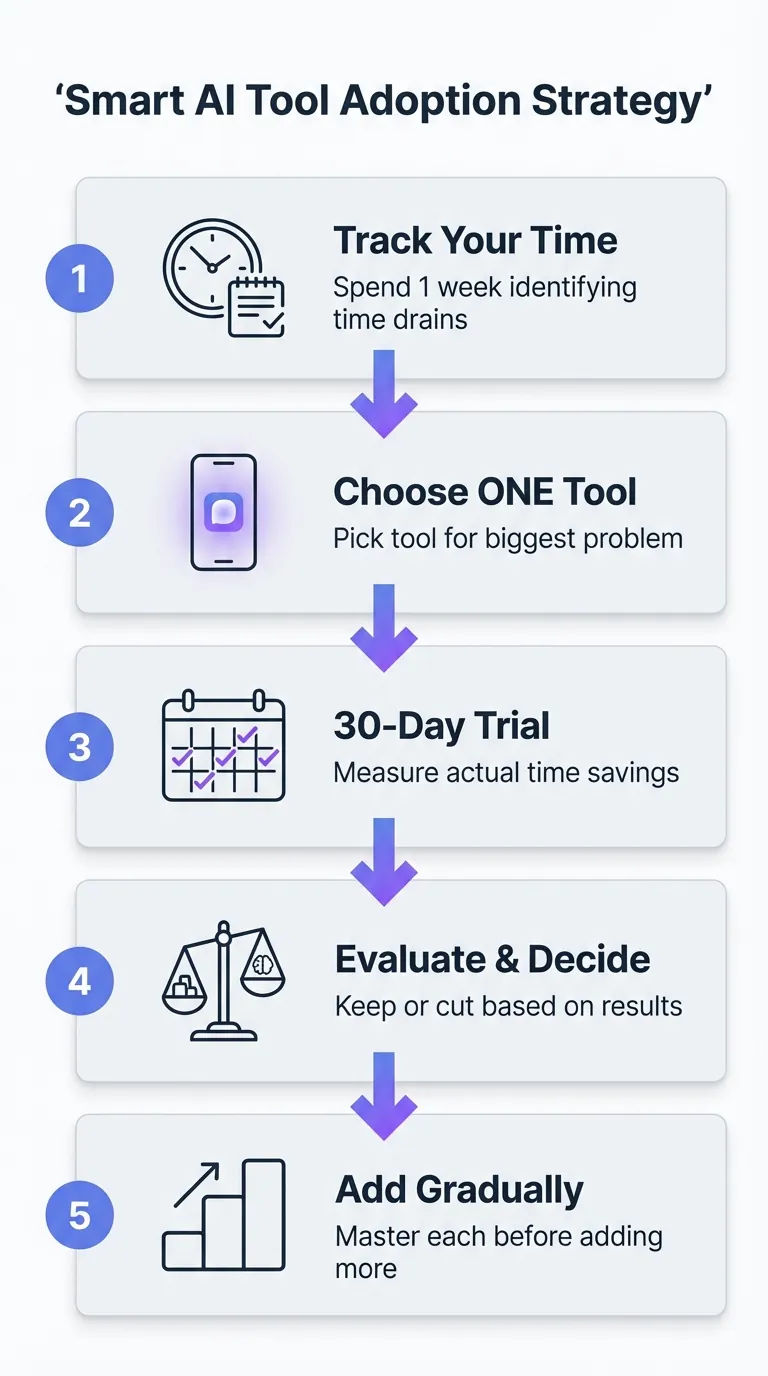
Focus on Your Major Time Drain
- Spend a week tracking where your time leaks happen
- Pinpoint your top 3 time-wasting culprits
- Choose a tool that addresses your biggest issue
Over on Reddit community discussions, people share what genuinely works for them. Someone asked: "Any AI productivity tools that actually worked for you?" Honest reviews always trump marketing fluff.
Avoid jumping to solutions.
The Basic 3-Tool Setup
Select one research tool, one writing aid, and a task manager. Get comfortable with each before adding more. Demir Bentley kicked off with ChatGPT, eventually growing into a 10-tool arsenal. Check out Goblin Tools to divide implementation into smaller steps.
Small, consistent habits with each tool win over haphazard trials.
Adding Tools vs Cutting Them
- Trial new tools for 30 days
- Quantify time savings with exact figures
- Purge tools monthly that you aren't using to avoid piling up digital clutter
PhotoRoom and AI meeting assistants enhance what you can do. AudioPen is perfect for capturing those on-the-fly thoughts.
Unspoken Costs of 'Free' Tools
Free services often charge you with your own data.
Privacy Compromises When Using Free AI
Free AI apps make money off your personal data and habits. Always check privacy agreements before uploading academic or sensitive info. European companies tend to enforce stricter data privacy compared to their American counterparts. For instance, MailMaestro leverages privacy as a key feature. Platforms like Notion and Evernote each manage data in their own way.
Pick tools wisely based on the data you share.
The Danger to Your Thinking Skills
Relying too heavily on AI may damage your critical thinking abilities for good.
Let AI tackle monotony, not your cognitive tasks. It's great for repetitive stuff, freeing you to strategize.
Just like muscles weaken without use, your analytical skills can fade. Keep honing your abilities in thought, creativity, and solving problems. Upholding academic honesty is more critical than ever.
When AI Eats Up More Time
Sometimes, tinkering with AI outputs consumes more time than writing from scratch. Endless tweak cycles can become time drains. Redditors have flagged accuracy issues, noting, "you just wind up investing more time reviewing and end up redoing it all anyway." Tools like Read.ai claim to save time.
Evaluate actual performance, not just theoretical promises. Services such as Fireflies automation and Julius AI demand a truthful appraisal of the value they add.
Conclusion
Demir Bentley managed to cut his workload from 80 hours to just 20, showing what's truly achievable. Embracing AI tools strategically can shift everything. In fact, 93% of power users genuinely experience increased productivity.

Don't overwhelm yourself by trying out all 30 tools simultaneously.
- Identify your biggest time sink and choose a single tool to tackle it
- Commit to a week of honest experimentation, tracking the time you actually save
- As you become proficient, gradually incorporate more tools
Yes, there's a productivity crisis - but it can be tackled. Control your hours instead of losing them to endless scrolling and emails.
Pick a tool right now, use it for a week, and see the difference.
Quit watching, and start engaging. Take back your time.
Share this
About AI Vid Summary Team
We're a passionate team dedicated to transforming how people learn from video content. At AI Vid Summary, we combine cutting-edge AI technology with user-friendly design to help students, professionals, and lifelong learners extract maximum value from YouTube videos and online courses.
Try AI Vid Summary


Loading comments...