How to Build a Personal Knowledge Management System That Actually Works in 2026
AI Vid Summary Team
12 min read
Introduction
Got 47 tabs open in your browser? Is your downloads folder cluttered with PDFs you vowed yourself you'd read? And that brilliant idea from last Tuesday? Disappeared.
I'm Piyush Agarwal. Over a decade, I transitioned from earning $200 a month as a freelancer to operating Massive Impact, my agency that now generates around $500K each year. I assist service business owners in automating their operations, granting them the freedom to enjoy life more fully. The key that unlocked everything for me wasn't about hustling more - it was creating a personal knowledge management system, transforming information chaos into clear paths.
Personal knowledge management goes beyond flashy apps or complex workflows. It's about capturing what's crucial, organizing it for easy access, and using it to make smarter decisions. Picture it as your second brain, except this one doesn’t misplace thoughts in the middle of the night.
I'll guide you to craft a PKM system customized to your life. No overwhelming details, no quest for perfection - just solid, practical steps that stick.
Why Your Brain Isn't Equipped for the 2026 Information Overload
The 86% Issue No One Mentions
Your brain? Designed to juggle about seven bits of information at a time. No more. Yet, you're inundated with Slack notifications, endless email threads, saved "read later" articles, and forgotten bookmarks.
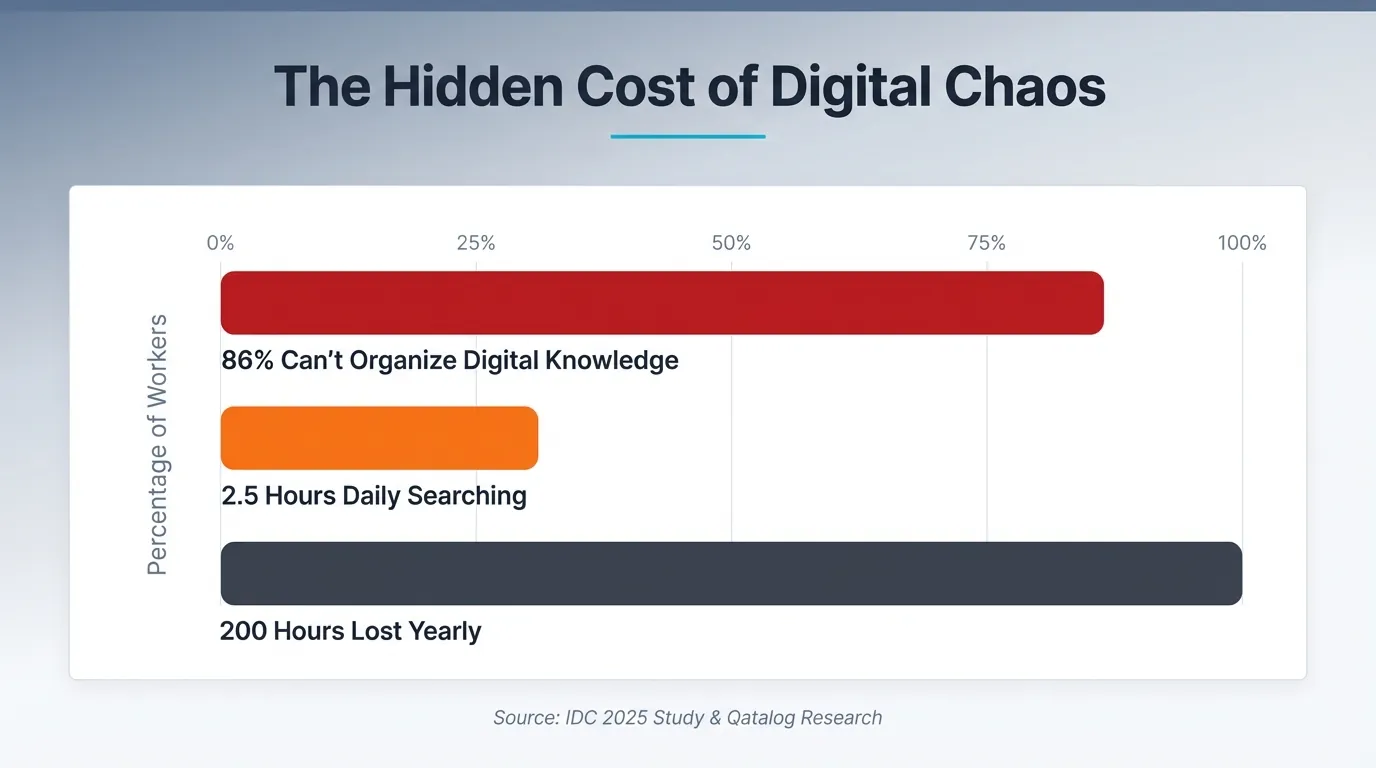
IDC's 2025 study reveals a staggering 86% of knowledge workers can't organize digital knowledge well.
The Hidden Cost of Digital Chaos - Workplace Productivity Statistics
This isn't some trivial hitch. We're dealing with professionals dedicating 2.5 hours daily just hunting for information they've already encountered.
That's the real crux.
The Real Cost of Information Overload
Organizing information goes beyond being tidy. It's about productivity for knowledge workers - or the glaring lack thereof. Qatalog's research indicates professionals lose3.6 hours every week due to ineffective digital workspace management. That's nearly 200 hours each year lost to recreating tasks or searching for information buried somewhere you can't remember.
I've been there myself. Just last year, during a pitch, I missed a crucial client insight. Why? I couldn't find the research I'd tucked away three weeks prior. The data was there, lost in a sea of browser tabs. It cost me the project.
Understanding Personal Knowledge Management
Your brain isn't designed to store every morsel of information you've ever acquired. It's more about connecting concepts, addressing challenges, and igniting new insights.
This is where personal knowledge management, or PKM, enters the scene. PKM is a deliberate approach to gathering what's significant, organizing it for effortless access, and retrieving it when you truly require it. It's not merely about amassing data (there's already too much digital clutter).
Imagine it: basic note-taking is simply writing things down. You attend a meeting, write down some thoughts, tuck them away, and probably never revisit them. Personal knowledge management for e-residents transforms this passive habit into an active knowledge framework. You intentionally capture insights, connect them to what you already understand, and curate a personal database that's genuinely useful. When it's time to formulate a proposal, resolve a client's problem, or make a strategic decision, your system provides just what you need.
The Essential Tasks Your System Must Perform
A robust PKM system must achieve three essential tasks:
Capture - Swiftly acquire info (meeting notes, article highlights)
Organize - Arrange it logically for easy access
Retrieve - Find it exactly when you need it
Why PKM Isn't Just About Notes
Taking notes is simple and isolated. Personal knowledge management is dynamic and interconnected. You note an idea on client onboarding, link it to automation tools, tag it with related projects, and that single note transforms into part of a broader knowledge network. Search for "client retention," and your system reveals connections you didn’t even realize you made.
The Core of Every PKM System
In 2024, I embarked on a three-week expedition to design what I considered the "ideal" PKM system. It had color-coded labels, layered directories, and intricate taxonomies. Yet, not a single useful note was recorded. Despite its aesthetic allure, the system was doomed from the outset, as I concentrated on organizing before I had anything worthwhile to organize.
It's common for individuals to undermine their PKM projects by overcomplicating them right from the beginning. They immerse themselves in methodology research, tool discussions, and excessively complex designs - often leading to burnout before they even capture their first genuine insight.
How Over-Organization Derails Most PKM Efforts
Our minds don't operate like conventional filing cabinets. They're all about associative connections rather than strict alphabetical order. When you impose categorization before capturing your ideas, it creates a barrier that halts the capture process. I've witnessed many abandon their elaborate setups because maintaining them demands more effort than they're worth. The goal isn't creating a flawless information architecture; it's about developing a learning system you'll actually utilize.
A Simple Structure That Actually Works
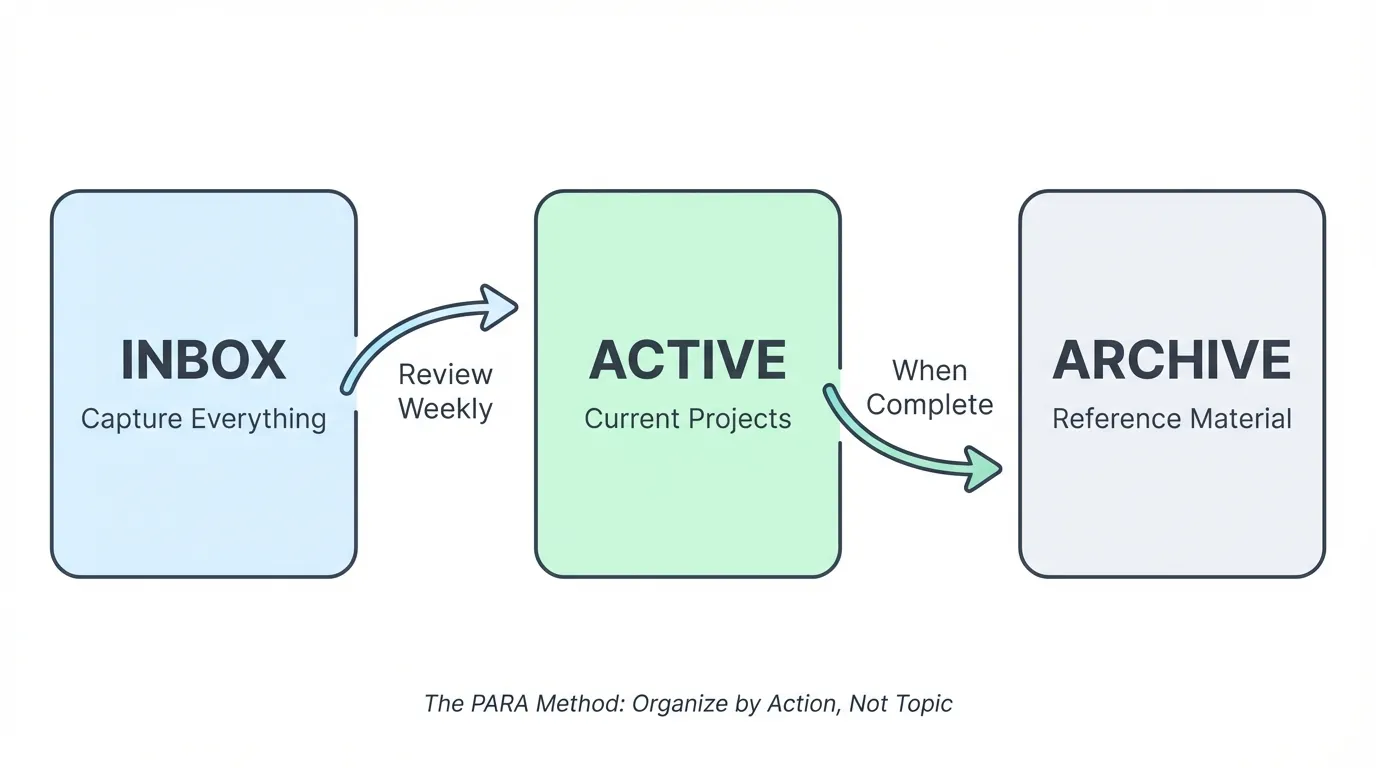
Begin with only three directories: Inbox, Active, Archive. That's it.
The PARA Method: Three-Folder PKM System Flowchart
Dump everything into your Inbox without sorting. For videos, tools like AI VidSummary can automatically extract key concepts from YouTube content, saving you hours of manual note-taking.
Move items to Active when you're working on them. Archive when complete.
This reflects the essence of the PARA method: organize by what you can act on, not by topic.
Add complexity later on. Right now, focus on building your capture habits.
Setting Up Your Capture System in 5 Minutes
Storing data? Not your brain's responsibility. Its true function is processing.
PKM Principle: Brain Processing vs Storage Quote
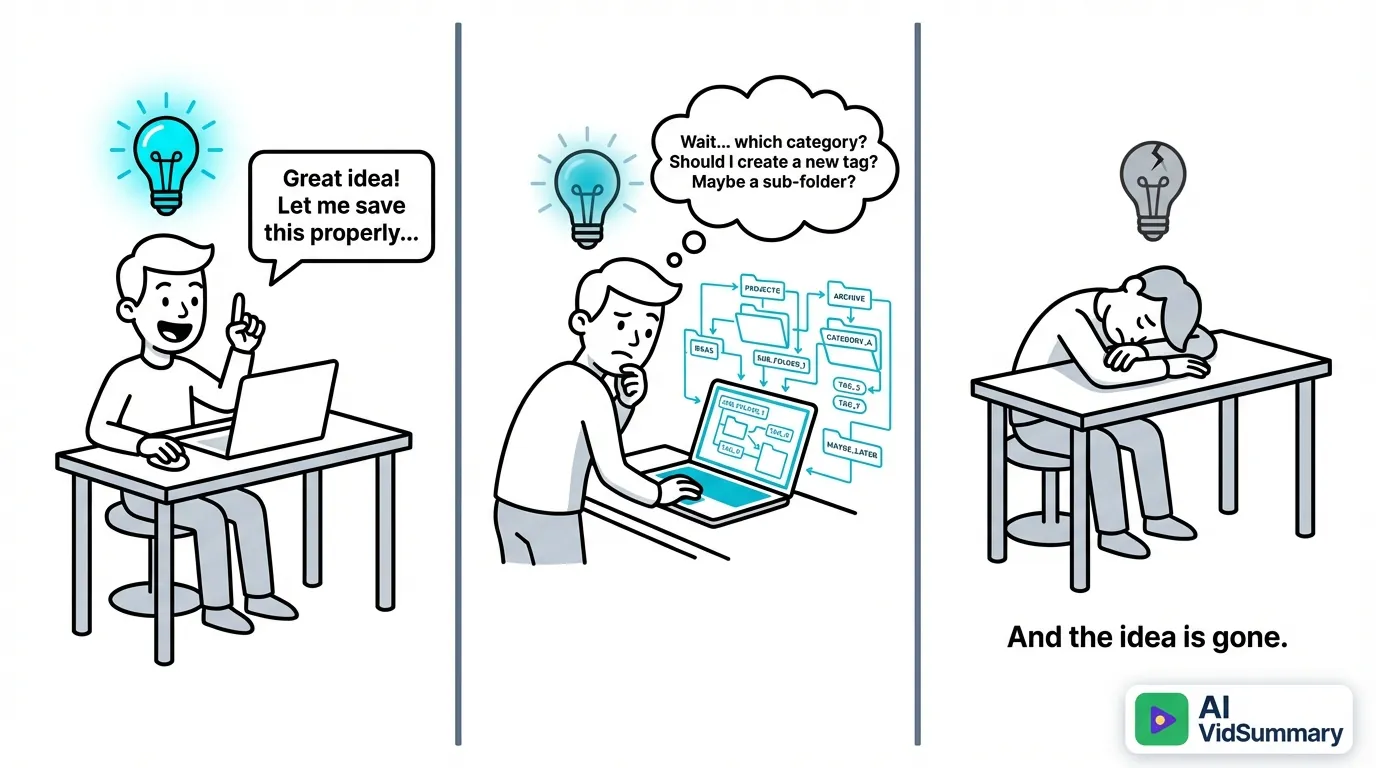
I've seen too many clients struggle in a sea of bookmarks, disconnected notes, and screenshots scattered across various devices. Adding another application won't assist. It's all about a straightforward capture rule I picked up through trial and error: if it takes more than two minutes to capture, it won't become a custom.
The Capture Friction Problem: How Ideas Get Lost
The Quick Capture Rule That Changed It All
Here's how I manage knowledge: when I encounter something valuable, I capture it instantly without worrying about format. An article heads to my Notion inbox via a one-click browser tool. Got a random idea? It goes as a voice memo on my phone. Insights from a meeting become quick bullet points in my daily note. The trick is eliminating any hassle - organizing comes later during my weekly review, not when the thought hits.
This method transformed my chaotic capture mess into a smooth operation.
Best Spots for Different Knowledge Types
Articles and resources find a home in my read-later application (Notion's Web Clipper is my choice, but Pocket works too). Random thoughts get placed into a fast-capture note, whether that's Apple Notes, Obsidian, or any application handy on your device. Meeting notes? They’re recorded in dated entries within your preferred PKM framework. Research content gets tagged with project names so retrieval is effortless.
Don't complicate things - start off with whatever tools are at your disposal. Change it up later when you recognize your habits. I went through three systems before finding the one that clicked, and that's perfectly fine.
The Inbox Tactic for Later Sorting
Set up a single "Inbox" location where everything goes initially. My version is simply named "Inbox" in Notion - no creativity needed.
Every Sunday morning, I dedicate 20 minutes to organizing it:
Delete what's irrelevant
Move actionable items to Active
File reference material to Archive
This approach halts the sorting chaos that often derails personal knowledge systems.
Arranging Your Knowledge for Simple Retrieval
Comparing Tags, Folders, and Links
Folders provide us a sense of safety, their structure resembling physical filing cabinets. However, the challenge arises when a note on "AI writing tools for content marketing" fits into several folders, yet you only check one. That's where tags come into play, allowing the same note to be labeled with #AI, #writing, #marketing, appearing wherever it might be pertinent.
Links elevate things to a different level.
Instead of placing information in strict hierarchies, they directly connect related concepts. When I jot down notes on ChatGPT prompts, I link them to information on content strategy, automation, and specific client projects, creating a knowledge web that reflects how the mind operates - through connections, not just alphabetical lists.
The best strategy is hybrid: broad folders for major areas like Work, Learning, Personal, tags for cross-thematic concepts, and links to weave your knowledge web.
Often, individuals overcomplicate this with dozens of nested folders. Start simple.
Zettelkasten's Brilliant Idea System
Zettelkasten might sound intricate - meaning "slip box" in German - but its essence is wonderfully straightforward. Each note gets a unique ID, remains focused (only one idea per note), and links to related concepts.
Capture instantly, organize soon - but don't delay too long.
The moment information strikes, get it down without worrying about its perfect location. I allocate 48 hours to convert captures into well-organized notes with appropriate links and tags. This helps avoid losing insights to "I'll sort it later" syndrome and ensures you don't spend all your time organizing without using your knowledge.
Being too organized can conceal procrastination.
How to Select Your PKM Tools Without Losing Your Sanity
Navigating the digital workspace can feel daunting, with numerous note-taking systems competing to be your "second brain." I’ve been there, spending countless hours switching tools before comprehending what's truly significant.
Three Fundamental Tool Types for Your Requirements
For personal knowledge management, concentrate on three essential functions:
Capture - Swiftly seize information (voice notes, web clippers, quick-entry apps)
Organize - Structure your knowledge with folders, tags, or links
Retrieve - Search and surface relevant information when needed
Start with a single tool that addresses these essentials well. Notion, Obsidian, or Apple Notes are excellent starting points for newcomers. If you learn through videos, AI VidSummary works with most PKM tools to capture video insights alongside your notes. Once you gain experience, you may contemplate using specialized apps for different functions, but don't rush into this, as complexity can derail progress swiftly.
Avoid pursuing unnecessary features.
Most individuals abandon their systems within a few weeks because they make them excessively complicated. I spent half a year hopping between tools until I ended up with a straightforward setup in Notion. The constant switching almost ruined my knowledge base entirely. Consistency aids your brain in forming patterns for information retrieval.
The Pitfalls of Tool Switching in PKM
Transitioning between tools disrupts your mental framework of where everything is stored. You squander weeks attempting to recreate effective structures, often leaving valuable notes behind in outdated systems.
Keeping Your System Operating Smooth Long-Term
A Quick 15-Minute Weekly Check-In
I've seen countless personal knowledge management systems collapse due to neglect. They often begin with enthusiasm but gradually turn into ignored digital wastelands. What distinguishes enduring systems from those that fade away? A ridiculously straightforward weekly check-up.
Here's how I do it.
On Sunday mornings, I allocate 15 minutes to reflect on three simple questions: What valuable ideas did I capture this week? Are there any notes needing connections that I overlooked? What's a key lesson I want to remember six months from now? I don't squander time reconfiguring my entire PKM setup or meticulously tagging items. It's all about ensuring my system stays functional, rather than becoming another deserted productivity tool.
Many assume maintenance requires hours of tedious organization. Not true. It's about stopping the chaos before it demands that kind of effort.
Think of it like dental flossing. Do it weekly, and it's quick. Ignore it for months, and you're in for an unpleasant, intense cleaning.
Assessing Your System's Effectiveness
Forget counting notes - those are just superficial metrics. The true measure? Can you access what you need precisely when you need it? I call it success in knowledge retrieval, and it outshines any other indicator. In a client meeting and searching for that crucial case study? Can you locate it within 30 seconds, or are you frantically digging through folders? A functional system means retrieval outpaces searching, every single time.
Conclusion
Crafting personal knowledge management isn't an overnight alteration into a flawless system. It's about shaping a workflow that aligns with your mind, aspirations, and daily life at this moment.
Here's your first step: select a capture tool today.
Notion, Obsidian, Apple Notes - whichever you select doesn't matter as much as utilizing it consistently. Capture ideas when they arise, sort through them weekly (not obsessively), and reflect on what's significant monthly. The system is meant to simplify things, not become more digital noise stressing you out. This isn't about accumulating info - it's about developing a learning framework to enhance your thinking and expedite your creation.
Anticipate your PKM setup to grow alongside you. I've reworked mine three times over five years, and that's perfectly normal. What suits you in 2026 may need modifications by 2027, which is the beauty of it - this is a dynamic system, not a stagnant tribute to productivity theater.
Share this
About AI Vid Summary Team
We're a passionate team dedicated to transforming how people learn from video content. At AI Vid Summary, we combine cutting-edge AI technology with user-friendly design to help students, professionals, and lifelong learners extract maximum value from YouTube videos and online courses.
Our mission is to make education more accessible and efficient by providing instant, AI-powered summaries, smart note-taking tools, and interactive chat features that turn passive watching into active learning.