
How to Take Better Notes in College That Actually Help You Learn
Table of Contents
Introduction
Ever opened your notes before an exam and wondered what language you were writing in? I've been there - staring at scribbled chaos that made zero sense.
The reality hits hard.
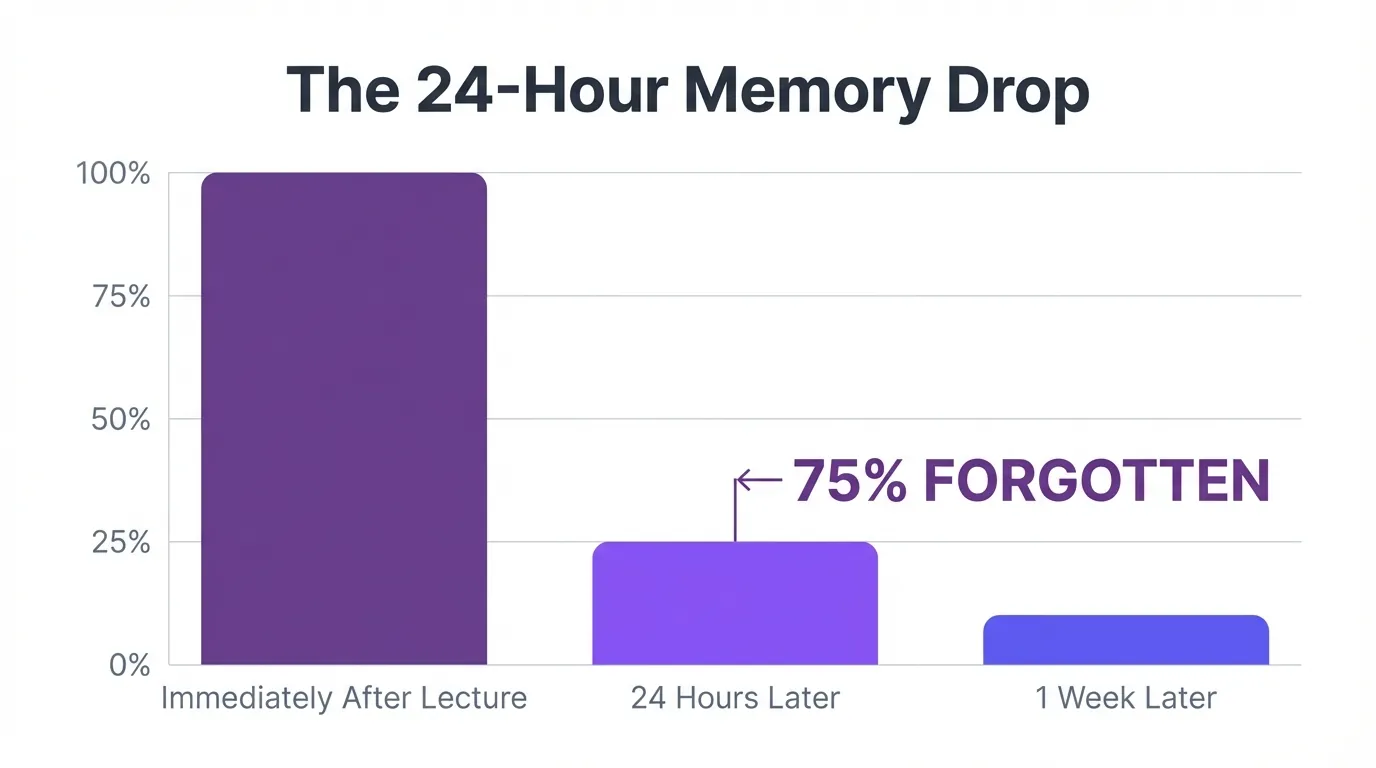
According to University of Pennsylvania research, your brain forgets 75% of lecture content within 24 hours.
Why Your Brain Forgets 75% of Your Notes Within 24 Hours
The 24-Hour Memory Drop Every Student Experiences
Your brain isn't broken. It's just ruthlessly efficient at deleting what seems unimportant.
Without active review, three-quarters of what you learned in class vanishes by tomorrow.
That's not a study skills problem.
That's how human memory works. Your brain prioritizes information you encounter repeatedly. Single-exposure content gets dumped fast. This is why cramming feels like learning everything from scratch.
What This Means for Your Study Strategy
Perfect notes mean nothing without review. A messy page reviewed within 24 hours beats beautiful notes you never look at again. Research from effective note-taking strategies shows that 30-minute review sessions within 24-36 hours lock in learning.
Your note-taking method matters less than you think. Your review timing matters way more.
The Cornell Method That Top Students Swear By
How the Three-Section System Works
The Cornell Learning Strategies Center developed this approach in the 1950s. Still dominates today because it demands active thinking.
Split your page into three parts. Right column captures lecture notes during class. Left cue column holds questions you create afterward. Bottom section contains a summary written in your own words.
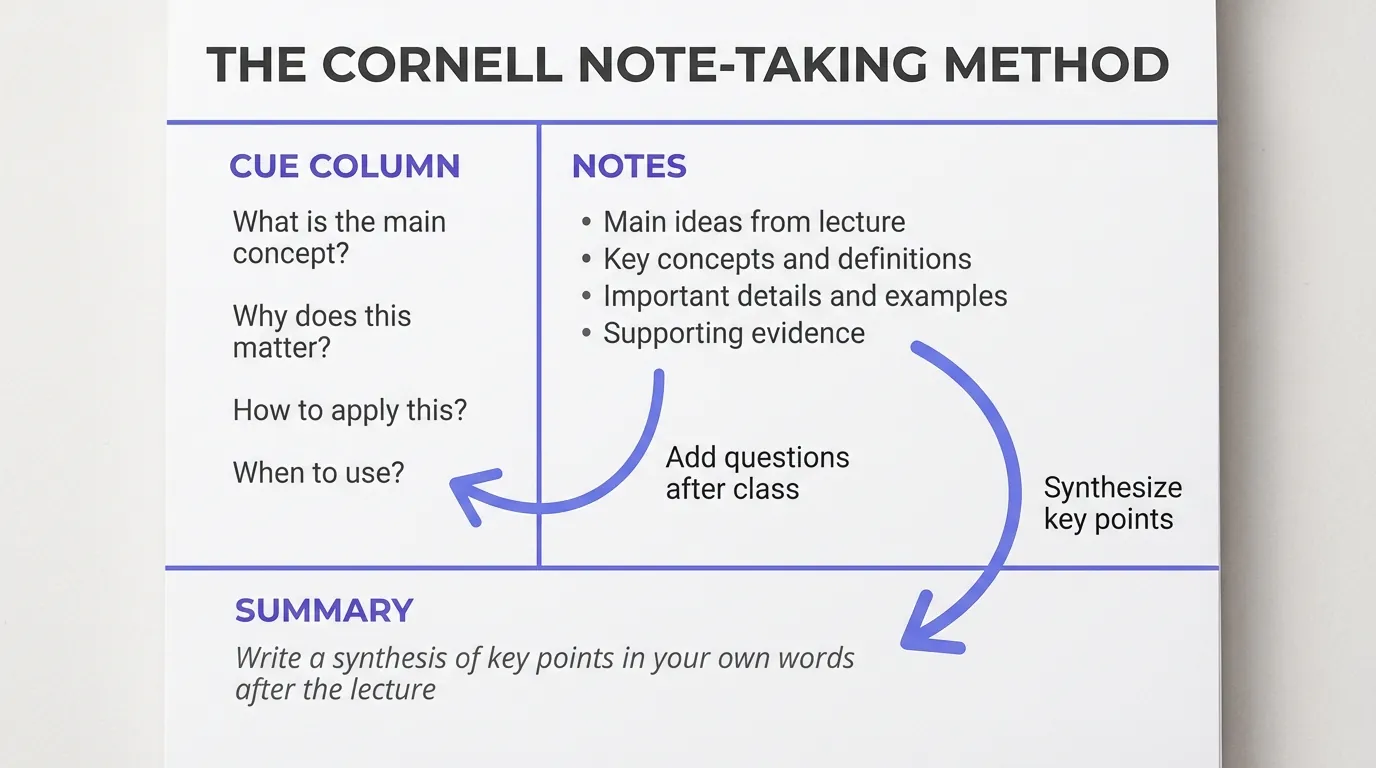
This setup transforms passive scribbling into active learning.
Each part serves a distinct purpose.
The cue column makes you think. The summary section makes you process everything twice.
Why This Method Beats Random Note-Taking by Miles
You're building a review system, not just recording information. The Harvard's note-taking research confirms this technique improves retention significantly.
Writing questions in the cue column means you're predicting exam questions. Summarizing tests whether you actually understood. This is active learning disguised as note organization, and it works according to proven note-taking methods.
Handwritten vs Digital Notes (What Science Actually Says)
Why Handwriting Wins for Conceptual Learning
Mueller and Oppenheimer's 2014 study in Psychological Science settled this debate. Students who handwrote notes performed better on conceptual questions. Typing lets you transcribe everything verbatim without processing. Handwriting forces you to summarize because you can't write fast enough.
That slowness? Actually a strength.
Your brain processes information when you rephrase it. Recent research on note-taking confirms handwriting improves memory for complex concepts.
When Digital Makes More Sense
Some professors talk way too fast for handwriting. Digital notes are searchable, shareable, and easier to organize. You can type code snippets, paste diagrams, and link related concepts instantly.
For recorded lectures or educational videos, tools like AI VidSummary can help students extract key points and create study notes from video content, complementing in-class note-taking strategies. Check out lecture video summarization for video-based learning support.
The Five Note-Taking Mistakes That Kill Your Grades
Trying to Write Down Everything Verbatim
Transcribing every word means zero mental processing.
Your brain switches to autopilot. You turn into a human recording device. Penn State note-taking research shows verbatim notes hurt comprehension. Capture main ideas and connections instead. Record what concepts mean, not what professors say exactly.
Professors repeat themselves anyway.
Multitasking During Lectures
Neuroscience destroyed the multitasking myth years ago. Your brain switches between tasks rapidly. Each switch costs you focus and comprehension.
That open laptop tab costs you more than you realize according to university note-taking guidelines.
Close everything except your notes. Silence your phone.
Never Reviewing Until Exam Week
Waiting three weeks means you're relearning, not reviewing. The 75% memory loss happens within one day. Academic support resources emphasizes reviewing within 24-36 hours prevents this loss.
Cramming feels harder because it is harder.
The 30-Minute Review Strategy That Locks In Learning
What to Do in Your First 30-Minute Review
Block out 30 minutes within 24-36 hours of class. Expand the sections you shortened during lecture. Add questions to your cue column while everything remains fresh in your mind.
Write a summary at the bottom using your own words. Can't summarize it? You didn't understand it. Mark confusing parts to bring up next class. This review stops the 75% memory drop according to study skills research and university learning strategies.
Active review reinforces memory.
How to Turn Notes Into Active Study Tools
- Transform main concepts into flashcards for spaced repetition
- Build practice questions from your cue column
- Design concept maps that connect ideas across lectures
For recorded lectures or educational videos, tools like AI VidSummary can help students pull out key points and generate study notes from video content, supporting in-class note-taking strategies. Check out AI tools for students and note-taking templates for extra support.
Your notes become your personalized study guide.
Best Digital Tools That Actually Improve Your Notes
Notion for Organized Note Databases
Notion allows you to build linked databases for each course. Tag notes by topic, date, and difficulty level.
Templates maintain consistent structure across all your classes. You can embed videos, code blocks, and diagrams. Search functionality finds anything in seconds. Integration options like Notion integration for notes support a smoother workflow.
Everything connects to everything else.
GoodNotes for Handwriting on iPad
You get the memory boost from handwriting. OCR technology makes your handwritten notes searchable. You can organize notebooks, add typed text, and insert images. Best of both worlds for students who want handwriting's cognitive benefits without paper clutter, as noted in note-taking strategies guide and learning center resources.
Conclusion
Stronger college notes depend on two straightforward principles.
Apply the Cornell Method and revisit your notes within 24-36 hours - check out resources at college success resources and university learning support to put these approaches into practice. Test handwritten against digital formats until you discover what works for you.
Your chosen technique holds far less weight than regular review, a point supported by academic resource center.
Share this

About AI Vid Summary Team
We're a passionate team dedicated to transforming how people learn from video content. At AI Vid Summary, we combine cutting-edge AI technology with user-friendly design to help students, professionals, and lifelong learners extract maximum value from YouTube videos and online courses.
Try AI Vid Summary


Loading comments...