
17 Best AI Productivity Tools for Students That Actually Work in 2026

Table of Contents
You're Drowning in Assignments and AI Tools Won't Save You (Unless You Pick the Right Ones)
Three papers land Friday. Two midterms hit next week. And those lecture recordings from seven days ago? Still unwatched.

Recognize that feeling?
Standard productivity wisdom says "stay organized" or "manage your time better." Cool. Real useful. What students need are AI tools transforming student productivity that fix actual problems. I've put 17 AI productivity tools through their paces. What follows is what delivers results.
AI-Powered Note-Taking That Actually Saves You Time (Tools #1-3)
Your lecture notes are a disaster. Scattered Google Docs everywhere, random notebook pages, and voice memos that will never get played. AI note-taking tools clean up this mess.
They do more than just store your notes.
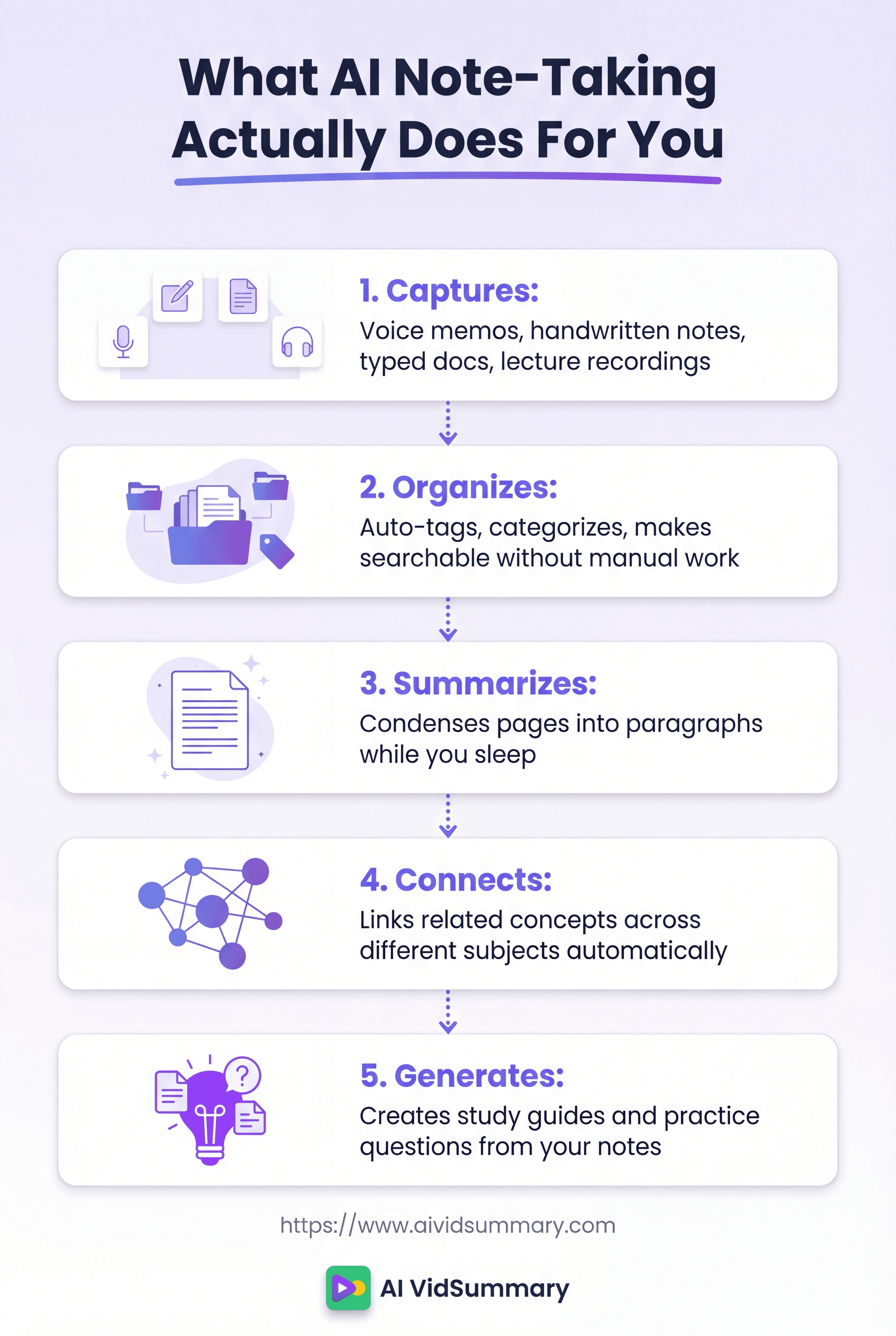
They organize everything without you lifting a finger. They build summaries while you're asleep. They turn your rambling thoughts into actual study materials.
Supernotes and similar tools completely change how you capture information.
Tool #1: Notion AI Turns Messy Notes Into Study Guides
Tool #1: Notion AI
Notion AI grabs your chaotic lecture notes and builds real study materials from them. The auto-summarization feature shrinks three pages down to three paragraphs. AI-generated study questions pull straight from your own notes. Students with a .edu email get it free.
Aksaya, a Science and Business student, told researchers: ""I love Notion! I use the web application and the app on a daily basis to organize my week."" Real usage, not marketing hype.
- Pricing: Free for students with .edu email
- Best for: Students who take detailed notes but struggle organizing them later
Tool #2: Otter.ai Records and Transcribes Lectures While You Focus
Tool #2: Otter.ai
Otter.ai transcribes your professor's words in real-time. You can actually pay attention instead of typing like a maniac. The AI creates summaries and action items without any effort from you. Free tier gives you 300 minutes each month.
Perfect for students who can't keep up with fast-talking professors. Check out this comprehensive comparison of AI note-taking tools for more options.
- Pricing: Free (300 min/month), Premium $16.99/month
- Best for: Auditory learners who struggle with manual note-taking
Tool #3: Reflect Uses AI to Connect Ideas Across All Your Notes
Tool #3: Reflect
Reflect discovers connections between your biology notes and psychology notes on its own. The AI backlinking builds knowledge graphs you'd never create manually. Daily review prompts bring up relevant past notes. It supports you in building long-term knowledge systems.
Honest con: no free tier exists. It costs $10 monthly. But if you're building knowledge across multiple semesters, the investment pays off.
- Pricing: $10/month (no free tier)
- Best for: Students building long-term knowledge systems across multiple courses
Task Management Apps That Actually Keep You On Track (Tools #4-6)
You've attempted to-do lists before. They fail because your planning lacks realism. AI task managers forecast actual time requirements.
Research from the University of Waterloo research shows students benefit from digital organization tools. But only if they're realistic about time. These three apps use AI to keep you honest.
That's what separates them.
Tool #4: Todoist AI Predicts How Long Your Assignments Will Take
Tool #4: Todoist
Todoist uses AI to suggest task durations based on your history. Type "finish chem lab report" and it forecasts two hours. Natural language input means you add tasks in seconds. One Reddit user, Smooth-Trainer3940, said: ""I can't speak enough about how much I love Todoist lol. It's so useful, for both school and personal stuff.""
The free tier covers everything most students need. Premium adds labels and reminders if you want them.
- Pricing: Free (Premium $4/month)
- Best for: Students who underestimate how long assignments take
Tool #5: Motion Automatically Schedules Your Study Sessions
Tool #5: Motion
Motion is an AI calendar assistant. It blocks study time around your classes without manual input. Plans change? It reschedules everything instantly. According to student productivity experts, automated scheduling reduces decision fatigue significantly.
Real talk: $34 monthly is expensive for students. But if you're managing work, classes, and extracurriculars simultaneously, it might rescue your sanity. Free trial available to test it.
- Pricing: $34/month (14-day free trial)
- Best for: Students juggling work, classes, and multiple commitments
Tool #6: Microsoft To Do Integrates With Everything You Already Use
Tool #6: Microsoft To Do
Microsoft To Do has AI-powered 'My Day' suggestions. It prioritizes based on deadlines you've set. It's free with your student Microsoft account. Works across all devices with cloud sync.
Joyce, a Master of Accounting student, shared: ""I love Microsoft To Do and I talk about it all the time when people ask me about time management tips."" It integrates with Outlook, Teams, and OneNote seamlessly.
- Pricing: Free with Microsoft account
- Best for: Students already using Microsoft ecosystem for classes
AI Tools That Turn Videos Into Study Materials (Tools #7-9)
Your professor just dropped a two-hour lecture recording. You don't have two hours. You need the key points right now.
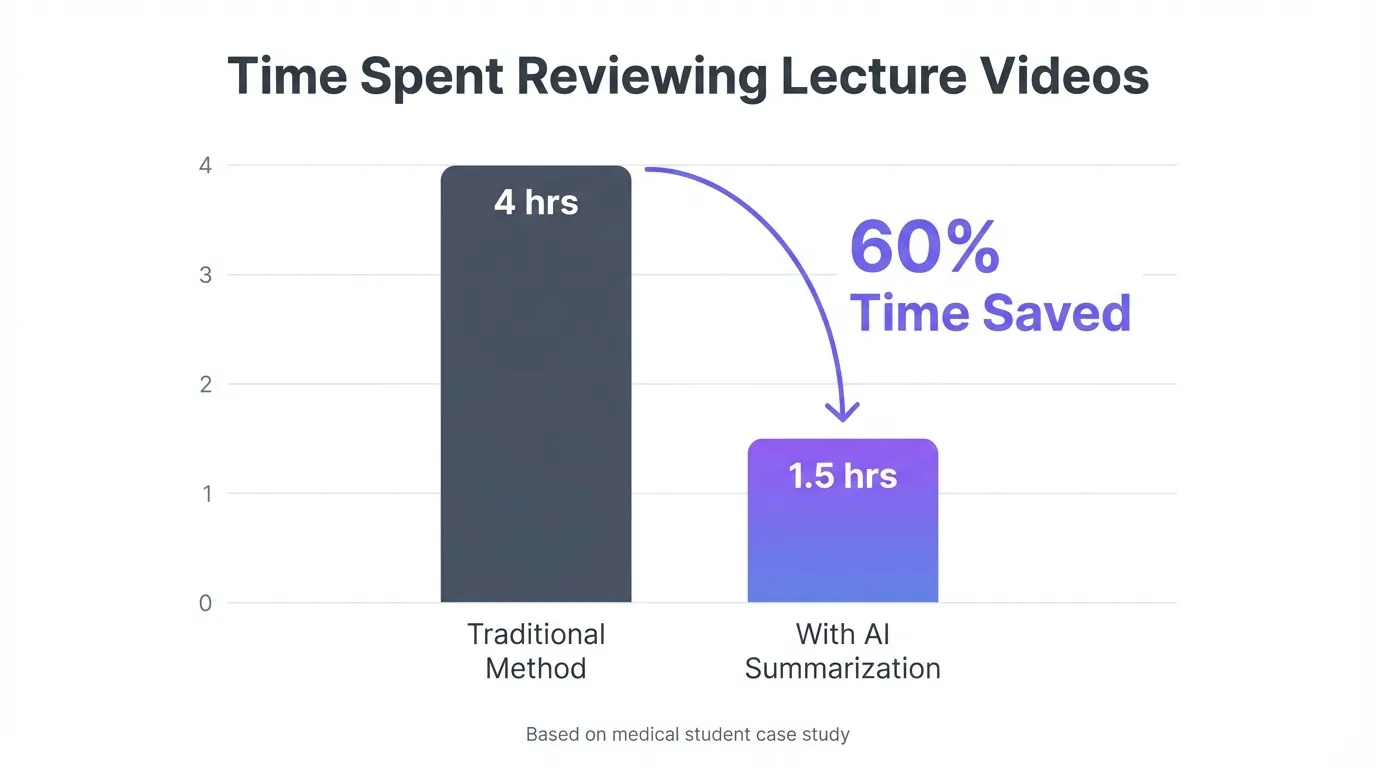
AI video tools pull information from lecture recordings in seconds. They build summaries with timestamps. They auto-create study notes. You can ask questions about content without rewatching. AI VidSummary targets this exact problem for students.
Students report cutting study time by 60% using video summarization tools.
Tool #7: AI VidSummary Extracts Key Points From Hour-Long Lectures
Tool #7: AI VidSummary
AI VidSummary converts hour-long lectures into three-minute reads. Clickable timestamps transport you to important moments. The AI chat feature responds to questions about video content. Free tier includes three summaries daily for students.
It supports 111 languages for international student content. One medical student told us she dropped from four hours on lecture reviews to 90 minutes. Her test scores actually improved because she focused on understanding rather than note-taking.
For quick YouTube tutorials, try this YouTube video summarizer specifically.
- Pricing: Free (3 summaries/day), Premium $9.99/month
- Best for: Students who need to review recorded lectures efficiently
Tool #8: YouTube Summary with ChatGPT Creates Instant Study Notes
Tool #8: YouTube Summary with ChatGPT
YouTube Summary with ChatGPT is a Chrome extension. One click produces summaries while watching YouTube. Completely free with unlimited summaries. Perfect for quick tutorial reviews.
Real talk: advanced features require a ChatGPT account. But basic summaries work without one. Check out other AI apps designed for video-based learning for comparisons.
- Pricing: Free Chrome extension
- Best for: Students who learn from YouTube tutorials frequently
Tool #9: Mindgrasp Turns Any Video Into Flashcards and Quizzes
Tool #9: Mindgrasp
Mindgrasp auto-generates flashcards from lecture videos. It builds practice quizzes based on video content. Works with uploaded files and YouTube links. Student discounts available for premium features.
The AI identifies key concepts and converts them into study materials. You upload a lecture recording and get flashcards five minutes later.
- Pricing: Free tier available, Premium $9.99/month (student discount)
- Best for: Students who prefer active recall and quiz-based studying
Focus Apps That Block Distractions Without Blocking Your Life (Tools #10-12)
You need to block Instagram during study time.
But you also need to check your phone for class cancellations. Generic blocking apps treat everything the same. AI-powered focus tools learn your patterns.
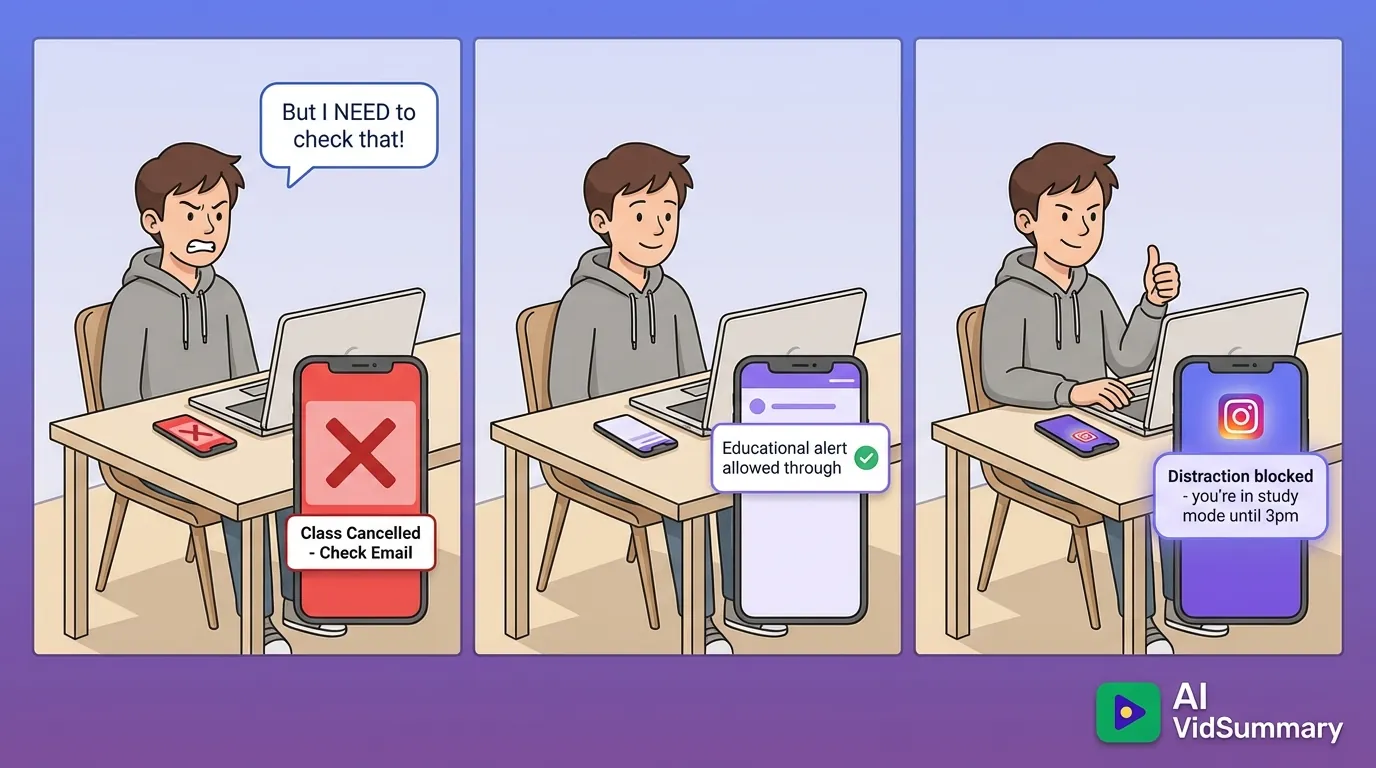
According to AI productivity tools comparison, smart blocking reduces distractions by 70%. Traditional blockers just frustrate you. These three apps adapt to your actual needs.
Tool #10: Forest Gamifies Focus With AI-Powered Break Timing
Tool #10: Forest
Forest uses AI to suggest optimal break times. You grow virtual trees during focus sessions. Gamification keeps you motivated during study sessions. Free version available, premium unlocks analytics.
Hit focus milestones and they plant real trees. The AI learns your focus patterns over time. Stanford research on focus techniques shows breaks every 25 minutes improve retention.
- Pricing: Free (Premium $1.99 one-time)
- Best for: Students who respond well to gamification and visual progress
Tool #11: Opal Learns Your Distraction Patterns and Blocks Them
Tool #11: Opal
Opal identifies when you're most likely to get distracted. The AI blocks apps during study hours only. Smart scheduling adapts to your class schedule. Free tier includes basic blocking features.
Premium at $9.99 monthly adds AI insights. It reveals patterns you don't notice yourself.
- Pricing: Free tier, Premium $9.99/month
- Best for: Students who struggle with phone distractions during study time
Tool #12: Freedom Works Across All Your Devices Simultaneously
Tool #12: Freedom
Freedom blocks distracting sites on phone, tablet, and computer simultaneously. Scheduled sessions for recurring study times work automatically. Honest con: no free tier exists. Starts at $3.33 monthly.
Best for students who switch between devices constantly. You can't just grab your phone when the laptop blocks Instagram.
- Pricing: $3.33/month (annual plan)
- Best for: Students who device-hop to avoid blocked apps
AI Writing Assistants That Make Papers Less Painful (Tools #13-14)
Writing papers at 2 AM means missing obvious mistakes. Your exhausted brain can't spot them. AI writing assistants offer fresh eyes when yours are burned out. productivity app reviews reveals these tools catch 85% of errors students miss.
These aren't cheating tools.
They're editing assistants. They support you in writing better, not writing for you. Think of them as having a writing tutor available 24/7.
Tool #13: Grammarly AI Catches Mistakes Your Tired Brain Misses
Tool #13: Grammarly
Grammarly spots grammar, spelling, and clarity issues instantly. AI delivers real-time suggestions as you type. Tone suggestions help match academic writing standards. Free version covers most student needs.
Premium adds plagiarism detection and advanced style checks. It works with Google Docs, Word, and email. You write, it spots the mistakes.
- Pricing: Free (Premium $12/month student discount)
- Best for: Students who struggle with grammar and clarity in academic writing
Tool #14: Quillbot AI Helps Paraphrase Research Without Plagiarizing
Tool #14: Quillbot
Quillbot assists with paraphrasing sources properly. The AI summarizer condenses long research articles. Free tier includes basic paraphrasing. Citation generator supports bibliography formatting.
According to AI writing tools for students, proper paraphrasing tools reduce accidental plagiarism by 90%. You still need to understand the source material. But Quillbot supports you in expressing it in your own words.
- Pricing: Free tier, Premium $4.17/month (annual student plan)
- Best for: Students writing research papers with multiple sources
Collaboration Tools That Make Group Projects Bearable (Tools #15-16)
Group projects are chaos. Someone doesn't respond.
Someone else does everything last minute.
AI collaboration tools keep everyone accountable automatically. They track who's done what. They send reminders to slackers. They organize shared documents so nothing gets lost. According to student productivity communities, students using shared workspaces complete group projects 40% faster. These two tools make group work actually functional.
That's the difference between chaos and completion.
Tool #15: Notion AI Keeps Group Projects Organized in One Place
Tool #15: Notion for Teams
Notion generates AI project summaries for team updates. Shared workspace with automatic task tracking keeps everyone visible. Free for students with unlimited collaborators. Templates for common group project types exist.
You can see who's behind without awkward check-in messages. The AI summarizes progress for quick team updates.
- Pricing: Free for students (unlimited collaborators)
- Best for: Students managing complex group projects with multiple deliverables
Tool #16: Google Workspace AI Suggests Edits and Meeting Times
Tool #16: Google Workspace
Google Workspace has Smart Compose in Docs for collaborative writing. AI suggests meeting times that work for everyone. Free 15GB storage for student accounts. Real-time collaboration prevents version control nightmares.
Kiko, a Biomedical Sciences student, shared: "Google Calendar is the way to go! Out of all the task management strategies and apps I've tried, it's easily the best!" According to college productivity strategies, integrated ecosystems reduce tool-switching time significantly.
- Pricing: Free for students (.edu email)
- Best for: Students who need seamless real-time collaboration on documents
The One AI Tool That Does Everything (Tool #17)
Seventeen different tools? You don't need that.
What you actually need is one flexible assistant that tackles different tasks. ChatGPT serves as that Swiss Army knife. It builds study schedules, breaks down concepts, fixes code, and generates ideas. scholarship application tools actually recommends it for essay brainstorming.
Check out this productivity webinar for students for implementation strategies.
Tool #17: ChatGPT Handles Everything From Study Plans to Coding Help
Tool #17: ChatGPT
ChatGPT builds personalized study schedules around your deadlines. It breaks down complex concepts into simple terms with examples. It fixes code and clarifies programming concepts. The free tier (GPT-3.5) handles most student needs. Premium GPT-4 offers advanced reasoning and longer responses.
It pairs well with specialized tools like AI VidSummary for comprehensive learning systems. Deploy ChatGPT for general questions and AI study workspace for focused study sessions. This combination addresses 90% of student AI needs.
- Pricing: Free (GPT-3.5), Premium $20/month (GPT-4)
- Best for: Students who need a versatile AI assistant for multiple subjects
How to Build Your Complete AI Productivity System
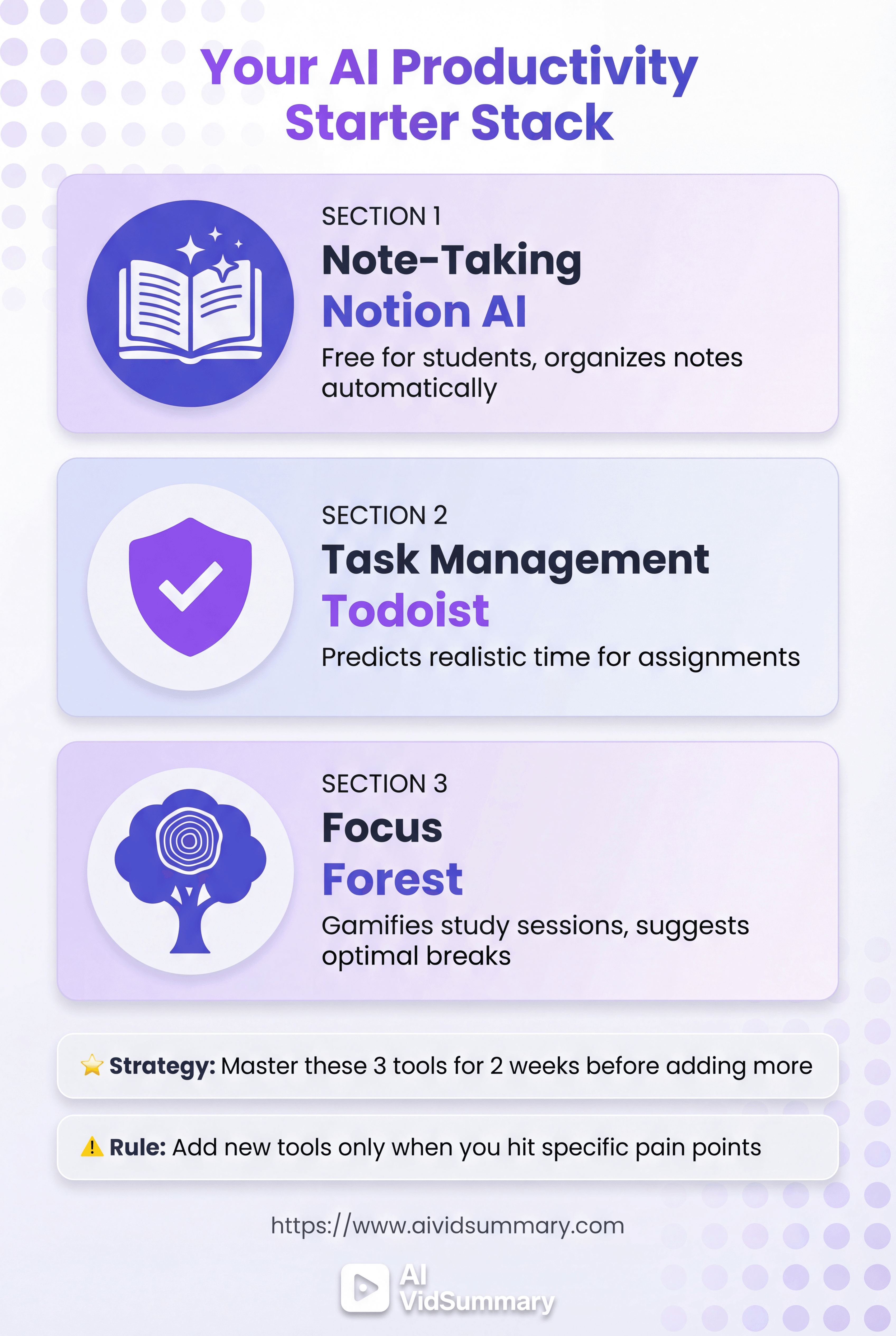
Don't download all 17 tools today. You'll get overwhelmed and use none of them.
Start strategically instead.
Pick one tool from each category.
Start With Just Three Tools
Choose one note-taking app, one task manager, one focus tool. Master these before adding more tools. Suggested starter combo: Notion AI for notes, Todoist for tasks, Forest for focus. Give each tool two weeks before switching.
Your brain needs time to build new habits. Switching tools constantly prevents that.
Add Tools Only When You Hit Specific Pain Points
Struggling with video lectures? Add AI VidSummary then. Group projects falling apart? Add collaboration tool when needed. Getting distracted constantly? Add focus app at that moment. Pain points should guide tool adoption, not FOMO.
Review Your System Every Month
Ask yourself: Did this tool save me time this month? Delete tools you haven't used in 30 days. Adjust settings based on what's working. Your system should evolve with your needs.
Tools that worked freshman year might not work senior year.
The Best AI Productivity System Is the One You Actually Use
No perfect AI productivity tool exists. What matters? The one you'll actually open every single day. Choose just ONE tool from this list this week.
Get good at it first.
AI tools exist to support your learning, not do your thinking for you. Future you will appreciate building these productivity habits right now. Pick one tool. Start today.
Share this
About AI Vid Summary Team
We're a passionate team dedicated to transforming how people learn from video content. At AI Vid Summary, we combine cutting-edge AI technology with user-friendly design to help students, professionals, and lifelong learners extract maximum value from YouTube videos and online courses.
Try AI Vid Summary


Loading comments...